Inspector Overlay & Base-Call Warnings
DxMessaging ships a Roslyn analyzer and a companion Unity Inspector overlay that catch the most common authoring mistake when subclassing MessageAwareComponent: forgetting to call base.OnEnable() (and friends) in your override. Without those base calls the messaging system does nothing -- every handler you registered silently fails to fire. This page is the user-facing tour of how the package surfaces the problem and how you fix it.
This guide covers when warnings appear, what the Inspector warning surfaces look like, the three actions they offer, the Project Settings panel, and the manual rescan menu. For the full reference -- every diagnostic id, exact detection policy, suppression precedence, and Unity 2021 setup notes -- see Roslyn Analyzers & Diagnostics.
The current diagnostic catalog starts at DXMSG002; no DXMSG001 is assigned. DXMSG002 through DXMSG005 are compiler and source-generator diagnostics, so they appear in Unity's Console or the IDE rather than in this Inspector overlay. The overlay covers DXMSG006 through DXMSG010.
Compiler Diagnostics Before the Overlay
| ID | Severity | Trigger |
|---|---|---|
DXMSG001 | - | Unassigned. The package does not emit this diagnostic. |
DXMSG002 | Error | One type has more than one Dx message-shape attribute. |
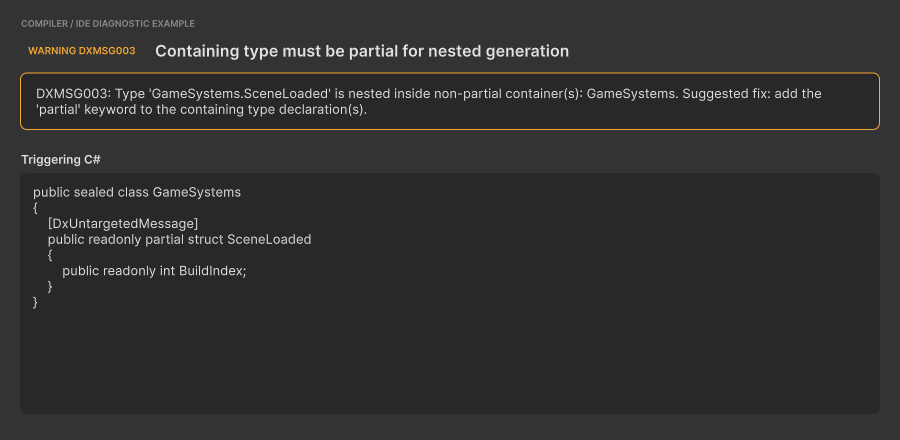
DXMSG003 | Warning | A generated nested type has a non-partial containing type. |
DXMSG004 | Info | Companion suggestion to add partial to that containing type. |
The following deterministic specimens pair the exact compiler output with the C# declaration that triggers it. They use the package capture theme so the text is readable and repeatable; they do not imitate Unity Console or IDE chrome.
DXMSG002: multiple message attributes
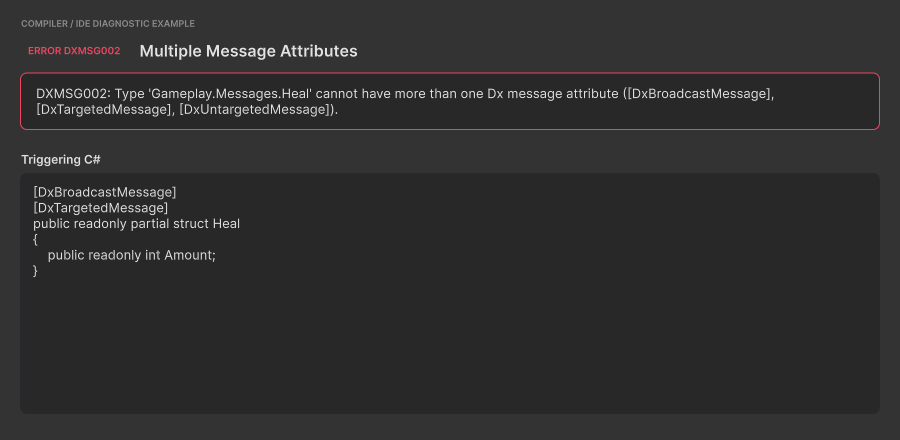
Choose exactly one of DxBroadcastMessage, DxTargetedMessage, or DxUntargetedMessage for each message type.
DXMSG003: non-partial containing type
DXMSG004: add partial suggestion
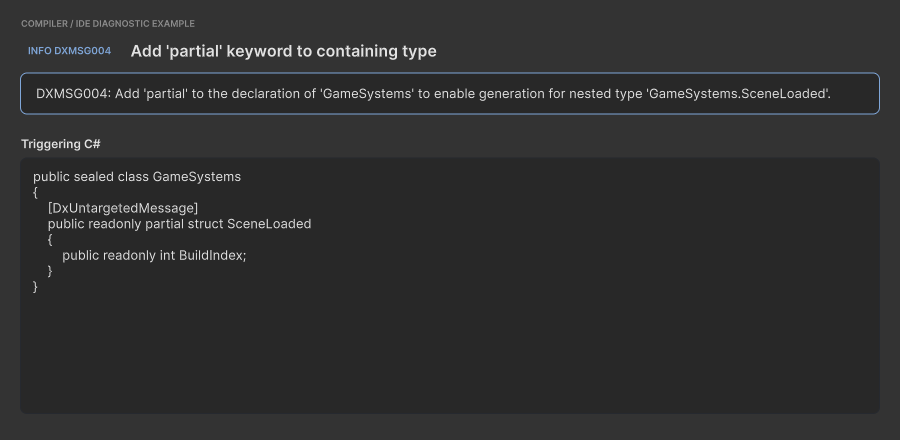
DXMSG003 and DXMSG004 intentionally point at the same declaration. Add partial to every containing type to resolve both diagnostics. See the analyzer reference for complete fixes and edge cases.
When a Warning Appears
Whenever your code triggers one of the base-call diagnostics (DXMSG006, DXMSG007, DXMSG009, or DXMSG010), two things happen in parallel:
- At compile time, the Roslyn analyzer (
WallstopStudios.DxMessaging.Analyzer.dll, shipped underRuntime/Analyzers/) emits a warning into Unity's Console with the correspondingDXMSG###id and a message that names the offending type and method. - At Inspector time, the overlay reads the cached scan from
Library/DxMessaging/baseCallReport.jsonand renders a warning panel at the very top of everyMessageAwareComponentsubclass's Inspector that has at least one missing base call.
You see both surfaces by default. The Console warning is authoritative for CI builds (the analyzer is activated for Unity's C# compiler through the RoslynAnalyzer label, so it runs on every Unity-driven compile); the Inspector overlay is the in-Editor reminder you cannot ignore while wiring a prefab.
Tip: Severity is per-project tunable. Add lines like
dotnet_diagnostic.DXMSG006.severity = errorto your.editorconfigto upgrade missing base calls into a build break, orseverity = noneto silence one project-wide. See Suppression precedence for the full ordering.
The Warning Surfaces
When the overlay decides to render for the normal DxMessaging-owned component inspector, it draws a compact UI Toolkit panel above your component's Inspector body, followed by a horizontal row of action buttons. User-defined custom editors for specific MessageAwareComponent subclasses keep their normal inspector body; the package injects the same warning data through Unity's component-header hook as an IMGUI HelpBox so the user's editor can stay in charge of its body.
While Unity imports or compiles, a new Inspector keeps its empty warning area hidden until it can resolve the warning state. An existing warning stays visible until that refresh completes.
The title includes the contributing diagnostic ID. An aggregated report sorts and deduplicates multiple IDs before rendering them.
DXMSG006: missing base call

DXMSG007: explicit lifecycle hide

DXMSG009: implicit lifecycle hide
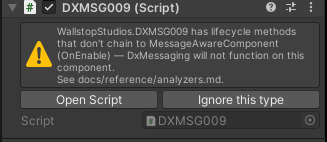
DXMSG010: broken transitive chain
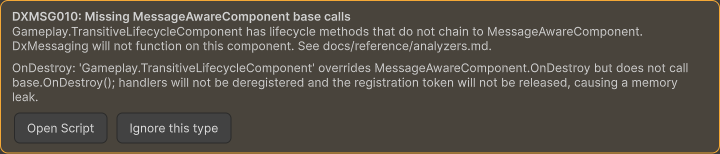
The panel follows this shape:
- Title:
DXMSG###: Missing MessageAwareComponent base calls - Body:
<FullyQualifiedTypeName> has lifecycle methods that do not chain to MessageAwareComponent. DxMessaging will not function on this component. - Method list: one row per missing method, such as
OnEnable: '<type>' overrides MessageAwareComponent.OnEnable but does not call base.OnEnable(); handlers will not be re-enabled when this component is enabled.
When the cache is stale (immediately after a domain reload, before the first post-reload scan completes), the panel includes a Report is cached from previous session; refreshing... line -- see Cached-from-previous-session annotation below.
The custom-editor IMGUI path uses Unity's native HelpBox instead of the retained UI Toolkit panel. Its text names the fully-qualified type, lists the missing methods, includes the same per-method consequence lines, points to docs/reference/analyzers.md, and appends (cached from previous session; refreshing...) while the cache is stale. It exposes the same Open Script and Ignore this type actions.
The method list is taken straight from the analyzer's per-type report -- typically one of Awake, OnEnable, OnDisable, OnDestroy, or RegisterMessageHandlers. A single component can list multiple methods if more than one override is broken.
Cached-from-previous-session annotation
After a domain reload -- when you enter Play Mode, recompile, or open the Editor -- the overlay needs a moment to rebuild its scan. Rather than flashing an empty Inspector and then suddenly showing a warning, the package eagerly loads the previous session's cache from Library/DxMessaging/baseCallReport.json so the warning is visible immediately.
While that cached data is being refreshed, the warning panel includes the stale-cache note Report is cached from previous session; refreshing.... The IMGUI header-hook path appends (cached from previous session; refreshing...) to the HelpBox body instead.
Once the first post-reload scan completes (typically within a single editor tick after assembly reload completes), the harvester flips its IsFreshThisSession flag and the note disappears. You do not need to do anything -- the Inspector repaints automatically. The annotation exists so you understand the data is from the previous session in the unlikely event you have just edited the offending source code and the Inspector is showing a warning that the latest compile would have fixed.
Three Inspector Actions
Below the warning surface the overlay draws a horizontal action row. The buttons that appear depend on whether the component's fully-qualified type name is currently in the project ignore list.
Default (warning) state
When the component is not ignored, you see two buttons:
- Open Script -- opens the offending component's source file at the top; when the legacy console bridge is enabled and a line number is available, the file opens at that line.
- Ignore this type -- appends the component's fully-qualified type name to the ignore list in
Assets/Editor/DxMessagingSettings.asset; the generated sidecar is refreshed for the analyzer. The next Inspector repaint flips the overlay into its info shape (below). The mutation is deferred to the next editor frame so the current GUI cycle completes cleanly -- there is no perceptible delay.
Ignored state
When the component is in the ignore list, the overlay shows the info shape -- the type is explicitly excluded from the base-call check -- and the action row collapses to a single button:

- Stop ignoring -- removes the component's fully-qualified type name from the ignore list. The ignored info state clears on the next repaint; if the type still violates the rule, the warning returns after the next fresh scan, compile, or manual rescan.
Warning: Adding a type to the ignore list silences the overlay and the compile-time base-call analyzer for that type, but it does not change the runtime behaviour. If the override genuinely never reaches
base.OnEnable(), the messaging system on that component is still dead. For finer-grained control, the source-level[DxMessaging.Core.Attributes.DxIgnoreMissingBaseCall]attribute suppresses the analyzer at the class or method level and is checked before the project ignore list. See the suppression precedence ordering for the full priority. Use either suppression path only when the silencing is intentional (for example, a deliberate adapter that should not participate in messaging), and document the reason for your team.
Message Subscriptions
Below the serialized fields, the package's MessageAwareComponent inspector shows a Message subscriptions section listing the registrations that component's MessageRegistrationToken currently holds. It reads the live token, so it answers "is this component actually listening, and to what?" without adding a log statement. A subclass with its own [CustomEditor] draws that editor instead, so the section does not appear there; the base-call warning above still does, through the header hook.

Each row shows:
- The message type name.
- The registration kind (
Untargeted,Targeted,Broadcast, a post-processor or interceptor variant) and the registration priority. - The observed call count, or
calls n/awhen diagnostics are not recording. - A dot on the right: green while the registration is subscribed on the bus, grey while the token is disabled.
The header summarizes the same thing: Listening | 3 registrations when the token is enabled, Disabled | 3 registrations when it is not. A disabled token is the usual explanation for a handler that stopped firing, because MessageAwareComponent.OnDisable disables the token by default. See MessageRegistrationTiedToEnableStatus for how to change that.
Registrations are created in Awake, so an inspector in Edit mode shows an empty state instead of rows. Call counts require diagnostics; turn them on through Diagnostics Targets below, or per token through MessageRegistrationToken.DiagnosticMode. The section samples the token while it is on screen and redraws only when the registrations, the token state, or the call counts change.
When you select several MessageAwareComponent objects of the same type, the section groups registrations by message type, registration kind, and priority. Each row reports how many selected components carry that registration. A green dot means every component carrying the row has an enabled token, grey means all of them are disabled, and amber means their enabled states differ. A count below the selection size shows that one or more selected components are missing the registration. Aggregate rows omit call counts because summing them would hide per-component differences.
Added in v3.3.0
Project Settings Panel
The package registers a UI Toolkit Project Settings page under Project Settings > Wallstop Studios > DxMessaging. The page is split into three sections:
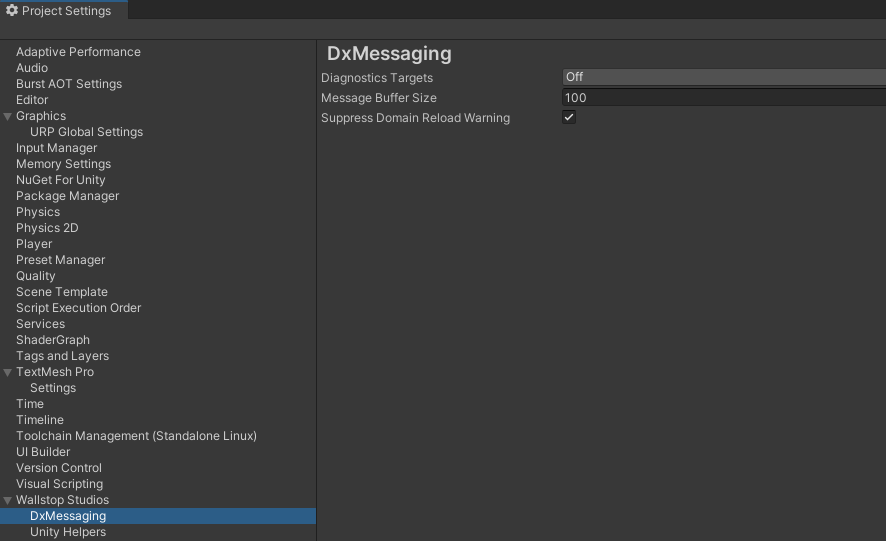
Diagnostics
- Diagnostics Targets -- flags-enum field (
Off,Editor,Runtime,All) controlling where global diagnostics are enabled. See Diagnostics for what this toggle activates. - Capture Emission Stack Traces -- enables call-site stack capture for diagnostic emission records. Leave it off until you need call-site evidence; it adds work and allocations to each recorded emission.
- Message Buffer Size -- integer; the default ring-buffer size used by every newly-created bus and token when diagnostics are active. Defaults to
IMessageBus.DefaultMessageBufferSize.
Editor Safety
- Suppress Domain Reload Warning -- checkbox; disables the warning Unity shows when "Enter Play Mode Options" skips a domain reload. DxMessaging still resets its statics, so the warning is noise on most projects.
Inspector Checks
- Base-Call Check Enabled -- master toggle for the Inspector overlay. When
false, the overlay is silenced; the underlying analyzer still emits the Console warning unless.editorconfigsays otherwise. - Use Console Bridge -- opt-in legacy bridge that unions Unity Console / compiler-message warnings into the IL-reflection scan. Default off.
- Ignored Base-Call Types -- fully-qualified
MessageAwareComponenttype names excluded from the overlay and analyzer. The overlay's Ignore this type / Stop ignoring buttons edit the same list.
The settings asset itself lives at Assets/Editor/DxMessagingSettings.asset. The ignored-types list is mirrored to the sidecar Assets/Editor/DxMessaging.BaseCallIgnore.txt that the analyzer reads via Assets/csc.rsp's -additionalfile: switch.
Note: The Inspector overlay's Ignore this type / Stop ignoring buttons read and write the same ignore-list field that Project Settings exposes. You can also bulk-edit the list directly from the settings asset Inspector.
For the field-by-field semantics -- including the ScriptableObject behaviour around OnValidate regenerating the sidecar -- see Inspector integration in the analyzer reference.
Tools > Wallstop Studios > DxMessaging > Rescan Base-Call Warnings
The package adds a manual rescan menu entry.
Click Tools > Wallstop Studios > DxMessaging > Rescan Base-Call Warnings to re-run the harvester on demand. You normally do not need to invoke this -- the package re-scans automatically on every assembly reload and after every per-assembly compilation event -- but it is useful when you have just toggled the master setting, edited the ignore list outside of Unity, or want to confirm that a fix has cleared a warning before the next domain reload.
The menu action is a no-op while Unity is mid-compile or mid-import. Automatic scheduled scans requeue for the next safe tick; if you click the menu during the blocked window, click it again after Unity finishes compiling or importing.
Worked Example
Let's walk through the most common case end-to-end. Suppose you have a HealthComponent that derives from MessageAwareComponent:
using DxMessaging.Unity;
using DxMessaging.Core.Messages;
using UnityEngine;

public sealed class HealthComponent : MessageAwareComponent
{
    protected override void OnEnable()
    {
        // Forgot base.OnEnable() -- Token.Enable() never runs,
        // every handler this component registered is dead.
        Debug.Log("HealthComponent enabled");
    }

    protected override void RegisterMessageHandlers()
    {
        base.RegisterMessageHandlers();
        _ = Token.RegisterComponentTargeted<ApplyDamage>(this, OnHit);
    }

    private void OnHit(in ApplyDamage m) => Debug.Log($"hit for {m.amount}");
}
What you see
After the next compile, the Console shows a DXMSG006 warning naming Game.HealthComponent.OnEnable. When you click into a GameObject that has HealthComponent attached, the Inspector renders the overlay warning panel at the top of the component:
The panel names OnEnable in its missing-method list and gives the runtime consequence for the missing base call. Open Script opens the component source file; when line data is available, it opens at that line.
Fixing it
Add the base call:
protected override void OnEnable()
{
    base.OnEnable();   // <-- the fix
    Debug.Log("HealthComponent enabled");
}
After the next compile, the DXMSG006 Console entry is gone. The Inspector warning disappears after the compile-triggered scan refreshes the report; if the Console is already clean but the Inspector still shows cached data, run Tools > Wallstop Studios > DxMessaging > Rescan Base-Call Warnings to refresh the overlay snapshot.
That is the entire loop: warning > fix > silence.
When the fix is intentional
If your override genuinely needs to skip the base implementation, or your fix delegates the base call into a helper method (a known false positive of the textual matcher -- see Detection policy (good-faith textual match)), suppress the analyzer at the class or method level with [DxIgnoreMissingBaseCall]:
using DxMessaging.Core.Attributes;

public sealed class FlashyComponent : MessageAwareComponent
{
    [DxIgnoreMissingBaseCall]
    protected override void Awake() => CallHelperThatChainsToBase();

    private void CallHelperThatChainsToBase() => base.Awake();
}
Each suppression emits an audit-only DXMSG008 so the opt-out shows up in your build report.
Related
- Roslyn Analyzers & Diagnostics -- every diagnostic id, the suppression-precedence ordering, and the Unity 2021 setup notes.
- Unity Integration -- the inheritance contract the analyzer enforces and the recommended
MessageAwareComponentpatterns. - Diagnostics -- diagnostics targets, registration logging, and emission history.
- Troubleshooting -- runtime symptoms ("my handler never fires") and how they map back to base-call mistakes.