Effects, Attributes, and Tags: Deep Dive
TL;DR: What Problem This Solves
- ⭐ Build buff/debuff systems without writing custom code for every effect.
- Data‑driven ScriptableObjects: designers create 100s of effects, programmers build the system once.
- Reduces boilerplate with data-driven effect definitions; designers can iterate without code changes.
- Note: Attributes are optional - use the system purely for tag-based state management and timed cosmetic effects.
Data-Driven Effect Authoring
The Problem - Hardcoded Effects:
The Solution - Data-Driven:
Designer Workflow:
- Create the effect asset in the editor (no code)
- Test in-game immediately
- Tweak values and iterate freely
- Create variations (Haste II, Haste III) by duplicating assets
Impact:
- Reduced boilerplate: Centralizes effect logic in a reusable system
- Designer workflow: Create and modify effects without code changes
- Faster iteration: Adjust values without recompiling
- Maintainability: All effects in one system vs. scattered scripts
Data‑driven gameplay effects that modify stats, apply tags, and drive cosmetic presentation.
This guide explains the concepts, how they work together, authoring patterns, recipes, best practices, and FAQs.
Visual Reference
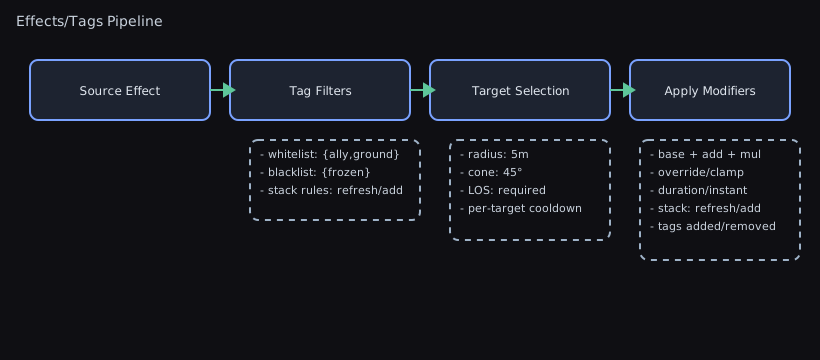
Concepts
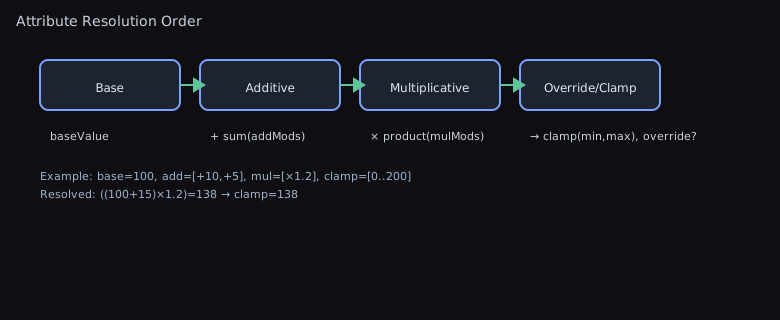
Attribute: A dynamic numeric value with a base and a calculated current value. Current value applies all active modifications.AttributeModification: Declarative change to anAttribute. Actions: Addition, Multiplication, Override. Applied in that order.AttributeEffect: ScriptableObject asset bundling modifications, tags, cosmetic data, duration policy, periodic tick schedules, and optional runtime behaviours.EffectHandle: Opaque identifier for a specific application instance (for Duration/Infinite effects). Used to remove one stack.AttributesComponent: Base MonoBehaviour exposing modifiableAttributefields (e.g., Health, Speed) on your character.EffectHandler: Component that applies/removes effects, tracks durations, forwards modifications toAttributesComponent, applies tags and cosmetics.TagHandler: Counts and queries string tags for gating gameplay (e.g., "Stunned"). Removes tags only when all sources are gone.CosmeticEffectData: Prefab‑like container withCosmeticEffectComponentbehaviours; reused or instanced per effect application.
How It Works
- You author an
AttributeEffectwith modifications, tags, cosmetics, and duration. - You apply it to a GameObject:
EffectHandle? handle = target.ApplyEffect(effect); EffectHandlerwill:- Create an
EffectHandle(for Duration/Infinite) and track expiration - Apply tags via
TagHandler(counted; multiple sources safe) - Apply cosmetic behaviours (
CosmeticEffectData) - Forward
AttributeModifications to allAttributesComponents on the GameObject - On removal (manual or expiration), all of the above are cleanly reversed.
Instant effects modify base values permanently and return null instead of a handle.
Authoring Guide
- Define stats:
| C# | |
|---|---|
- Create an
AttributeEffectasset (Project view → Create → Wallstop Studios → Unity Helpers → Attribute Effect): - modifications: e.g.,
{ attribute: "Speed", action: Multiplication, value: 1.5f } - durationType:
Durationwithduration = 5 - resetDurationOnReapplication: true to refresh timer on re-apply
- effectTags: e.g.,
[ "Haste" ] -
cosmeticEffects: prefab with
CosmeticEffectData+CosmeticEffectComponentscripts -
Apply/remove at runtime:
| C# | |
|---|---|
- Query tags anywhere:
Refresh and Tag Ownership During Callbacks
An effect removal callback can refresh another active duration effect through RefreshEffect, EnsureHandle, or reapplication. The refreshed effect keeps its handle and remains active until its new deadline, even when it was already selected for expiry in that update. A throwing callback still allows other genuinely expired effects to finish removal before its exception is reported.
Each handle records the tags it actually applies. Changing or destroying the effect asset does not change those active tags: handle queries and removal use the recorded identities. Duplicate tags retain their individual counts, and literal whitespace tags remain valid. Application takes a snapshot before callbacks; tags not yet applied do not appear in handle queries. Removal or a failed application releases its recorded tags without decrementing tags owned by another handle. Reapplying the same handle during a callback starts a new application; the interrupted application cannot continue changing its tags or unwind the replacement. Removal by tag also preserves newly tracked applications created by its callbacks, including applications of the requested tag. Destroying the tag component during application stops further tag notifications and releases its recorded ownership.
Understanding Attributes: What to Model and What to Avoid
Important: Attributes are NOT required! The Effects System works well when used solely for tag-based state management and cosmetic effects.
What Makes a Good Attribute?
Attributes work best for values that are:
- Primarily modified by the effects system (buffs, debuffs, equipment)
- Derived from a base value (MaxHealth, Speed, AttackDamage, Defense)
- Calculated values where you need to see the result of all modifications
What Makes a Poor Attribute?
❌ DON'T use Attributes for "current" values like CurrentHealth, CurrentMana, or CurrentAmmo!
Why? These values are frequently modified by multiple systems:
- Combat system subtracts health upon damage
- Healing system adds health
- Regeneration ticks add health over time
- Death system resets health to zero
- Save/load system restores health
The Problem:
The Solution - Separate Current and Max:
Attribute Best Practices
✅ DO use Attributes for:
- MaxHealth, MaxMana, MaxStamina - caps that buffs modify
- Speed, MovementSpeed - continuous values modified by effects
- AttackDamage, Defense, CritChance - combat stats
- CooldownReduction, CastSpeed - multiplicative modifiers
- CarryCapacity, JumpHeight - gameplay parameters
❌ DON'T use Attributes for:
- CurrentHealth, CurrentMana - depleting resources with complex mutation
- Position, Rotation - physics/transform state
- Inventory count, Currency - discrete counts from multiple sources
- Quest progress, Level - progression state
- Input state, UI state - transient application state
Saving and Loading an Attribute
Only BaseValue and CurrentValue are serialized (the active modifications are not), so the two restore paths deliberately differ:
- JSON (
Serializer.JsonStringify/JsonDeserialize) keeps theCurrentValuethat was written. An attribute saved while buffed loads with the buff still in the number, because recalculating from a base value with no modifications would silently drop it. - Unity serialization (a
[SerializeField]on aMonoBehaviourorScriptableObject) recalculates from the base value on the first read, because the modifications that produced the saved number belong to a session that has ended.
Call ClearCache() after a JSON load if you intend to rebuild the modifications yourself and want the value to follow them.
The cache also follows the base value. Writing BaseValue through the Inspector, a prefab apply or an undo assigns the field without running any code, so CurrentValue recalculates on the next read rather than reporting a number computed from the old base.
Why This Matters
When you use Attributes for frequently mutated "current" values:
- State conflicts - The effects system and other systems fight over the value
- Save/load bugs - Unclear whether to save base value or current value with modifiers
- Unexpected restorations - Removing an effect may restore old base value, losing damage/healing
- Performance overhead - Recalculating modifications on every damage tick
- Complexity - Need to carefully coordinate between effects and direct mutations
The Golden Rule: If a value is modified by systems outside the effects system regularly (combat, regeneration, consumption), it should NOT be an Attribute. Use a regular field instead and let Attributes handle the maximums/limits.
Using Tags WITHOUT Attributes
Even without any Attributes, the Effects System is useful for tag-based state management and cosmetic effects.
When to Use Tags Without Attributes
You should consider tag-only effects when:
- Managing categorical states ("Stunned", "Invisible", "InDialogue")
- Implementing temporary permissions ("CanDash", "CanDoubleJump")
- Coordinating system interactions ("InCombat", "InCutscene")
- Creating purely visual effects (particles, overlays) with timed lifetimes
- Building capability systems without numeric modifiers
Example: Pure Tag Effects
Example: Tag Lifetimes for Cosmetics
Tags with durations provide automatic cleanup for visual effects:
Benefits of Tag-Only Usage
- ✅ Simpler setup - No AttributesComponent required
- ✅ Automatic cleanup - Duration-based tags clean up themselves
- ✅ Reference counting - Multiple sources work naturally
- ✅ Cosmetic integration - Visual effects lifecycle managed automatically
- ✅ System decoupling - Any system can query tags without dependencies
Tag-Only Patterns
1. Temporary Permissions:
| C# | |
|---|---|
2. State Management:
| C# | |
|---|---|
3. Visual-Only Effects:
| C# | |
|---|---|
Cosmetic Effects - Complete Guide
Cosmetic effects handle the visual and audio presentation of effects. They provide a clean separation between gameplay logic (tags, attributes) and presentation (particles, sounds, UI).
When a cosmetic component is destroyed, it calls OnRemoveEffect for each tracked target that still exists. Cleanup uses a snapshot, so a removal callback can change the tracked targets without skipping the remaining callbacks.
Architecture Overview
Component Hierarchy:
| Text Only | |
|---|---|
Creating a Cosmetic Effect
Step 1: Create a prefab with CosmeticEffectData
- Create a new GameObject in the scene
- Add Component →
CosmeticEffectData - Add your custom cosmetic components (particle systems, audio sources, etc.)
- Save as prefab
- Reference this prefab in your
AttributeEffect.cosmeticEffectslist
Step 2: Implement CosmeticEffectComponent subclasses
RequiresInstance: Shared vs Instanced
RequiresInstance = false (Shared):
- One cosmetic instance is reused for all applications
- Best for: UI overlays, status icons, shared audio managers
- Lower memory footprint
- All targets share the same cosmetic GameObject
RequiresInstance = true (Instanced):
- New cosmetic instance created for each application
- Best for: Particles, per-effect animations, independent visuals
- Each application has an isolated state
- Higher memory cost, but full independence
CleansUpSelf: Automatic vs Manual Cleanup
CleansUpSelf = false (Automatic - Default):
- EffectHandler destroys the GameObject when an effect is removed
- Simplest option for most cases
- Immediate cleanup
| C# | |
|---|---|
CleansUpSelf = true (Manual Cleanup):
- You are responsible for destroying the GameObject
- Use when you need delayed cleanup (fade out animations, particle finish)
- More control over cleanup timing
Complete Cosmetic Examples
Example 1: Buff Visual with Particles and Sound
Example 2: Status UI Overlay (Shared)
Example 3: Animation Trigger
Combining Multiple Cosmetics
A single effect can have multiple cosmetic components with different behaviors:
| C# | |
|---|---|
Cosmetic Lifecycle
Application Flow:
AttributeEffectapplied to GameObjectEffectHandlercheckscosmeticEffectslist- For each
CosmeticEffectData: - If
RequiresInstancing = true: Instantiate and parent to target - If
RequiresInstancing = false: Reuse existing instance - Call
OnApplyEffect(target)on all components - Cosmetics remain active while an effect is active
Removal Flow:
- Effect expires or is manually removed
EffectHandlercallsOnRemoveEffect(target)on all components- For each component:
- If
CleansUpSelf = false: EffectHandler destroys GameObject immediately - If
CleansUpSelf = true: Component handles its own destruction
Best Practices
Performance:
- ✅ Prefer
RequiresInstance = falsewhen possible (lower overhead) - ✅ Use object pooling for frequently spawned instanced cosmetics
- ✅ Keep
OnApplyEffectandOnRemoveEffectlightweight - ❌ Avoid expensive operations in these callbacks
Architecture:
- ✅ One responsibility per cosmetic component (particles, audio, UI separate)
- ✅ Store references in
OnApplyEffect, use them inOnRemoveEffect - ✅ Always call
base.OnApplyEffect()andbase.OnRemoveEffect() - ❌ Don't access gameplay logic from cosmetics (maintain separation)
Cleanup:
- ✅ Use
CleansUpSelf = falseunless you need delayed cleanup - ✅ If using
CleansUpSelf = true, ensure you always destroy the GameObject - ✅ Handle null targets gracefully (target may be destroyed early)
- ❌ Don't leak GameObjects by forgetting to clean up
Recipes
1) Buff with % Speed for 5s (refreshable)
- Effect: Multiplication
Speed *= 1.5f,Duration=5,resetDurationOnReapplication=true, tagHaste. - Apply to extend: reapply before expiry to reset the timer.
2) Poison: "Poisoned" tag 10s with periodic damage
- periodicEffects: add a definition with
interval = 1s,maxTicks = 10, and an emptymodificationsarray (ticks drive behaviours) - behaviors: attach a
PoisonDamageBehaviorthat applies damage duringOnPeriodicTick(sample below) - durationType: Duration
10s(or Infinite if the periodic schedule should drive expiry) - effectTags:
[ "Poisoned" ] - cosmetics: particles + UI icon
- Optional: add an immediate modification for on-apply burst damage
Pair this with a health component that owns mutable current-health state instead of modelling CurrentHealth as an Attribute.
Current Resource Ownership Pattern
For health, mana, stamina, ammo, shields, and similar resources, keep one component responsible for mutable current state and use Attributes only for caps or rates. This avoids hidden restore bugs when an effect expires.
| Resource concern | Recommended owner | Reason |
|---|---|---|
| Current value | Gameplay component field/property | Damage, healing, save/load, and UI use explicit APIs |
| Maximum value | Attribute | Buffs, equipment, and effects can modify the cap |
| Regeneration rate | Attribute | Effects commonly modify rates or multipliers |
| Damage over time | EffectBehavior calling the resource API | The effect schedules the tick; the resource still owns mutation |
3) Equipment Aura: +10 Defense while equipped
- durationType: Infinite
- modifications: Addition
{ attribute: "Defense", value: 10f } - Apply on equip, store the handle, remove on unequip.
4) One‑off Permanent Bonus
- durationType: Instant (returns null)
- modifications: Addition or Override on base value (no handle; cannot be removed).
5) Stacking Multiple Instances
- Set
stackingModeon the effect asset to control reapplication: Stackkeeps separate handles (respectingmaximumStacks, trimming the oldest when the cap is reached).Refreshreuses the first handle; setresetDurationOnReapplication = trueif the timer should reset on reapplication.Replaceremoves existing handles in the same group before adding a new one.Ignorerejects duplicate applications.- Use
stackGroup = CustomKeywith a sharedstackGroupKeywhen different assets should share a stack identity. - Inspect active stacks with
EffectHandler.GetEffectStackCount(effect)or tag counts for debugging and UI. - An
OnEffectRemovedsubscriber that re-applies the same effect can leave aStackeviction no smaller than it started.ApplyEffectthen returnsnulland logs a warning rather than registering a handle pastmaximumStacks, so aStackapplication is one of the two cases where a non-instant effect answersnull.
6) Shared vs. Instanced Cosmetics
- In
CosmeticEffectData, set a component’sRequiresInstance = truefor per‑application instances (e.g., particles). - Keep
RequiresInstance = falsefor shared presenters (e.g., status icon overlay).
Periodic Tick Payloads
- Populate the
periodicEffectslist on anAttributeEffectto schedule damage/heal-over-time, resource regen, or scripted pulses without external coroutines. - Each definition supports
initialDelay,interval, andmaxTicks(0 = infinite) plus its ownAttributeModificationbundle applied on every tick. - Periodic payloads run only for Duration/Infinite effects; they automatically stop after
maxTicksor when the effect handle is removed. - Combine multiple definitions for mixed cadences (e.g., fast minor regen + slower burst heals).
Periodic schedules preserve their initial delay and cadence at large finite clocks. Repeated processing at an unchanged clock does not create new due ticks; an overdue schedule can still consume its backlog, bounded to 32 ticks per definition per pass. Ticks include the exact scheduled boundary, and moving the finite clock backward leaves the phase unchanged. Intervals below 0.01 seconds use that minimum; negative initial delays use zero.
Refreshing or reapplying an existing handle preserves its periodic phase and tick count. Removing it and applying a fresh handle starts a new schedule. Initial delay and interval are captured when the handle is created; changes to maxTicks remain live. Nonfinite timing retains its existing comparison behavior.
Effect Behaviours
- Attach
EffectBehaviorScriptableObjects to thebehaviorslist for per-handle runtime logic. - The system clones behaviours on application and calls
OnApply,OnTick(each frame),OnPeriodicTick(after periodic payloads fire), andOnRemove. - Behaviours are ideal for integrating bespoke systems (e.g., camera shakes, AI hooks, quest tracking) while keeping designer-authored effects data-driven.
- Keep behaviours stateless or store per-handle state on the cloned instance; clean up in
OnRemove.
Removal Is Two-Phase
Removing an effect happens in two steps, and callbacks only ever run in the second.
- Detach. The handle leaves every index the handler keeps -- active effects, stack group, expiration, periodic schedule, behaviours and cosmetics -- before a single line of your code runs.
- Notify and release. Attribute modifications are removed, then tags, then cosmetics, then
OnEffectRemoved, thenEffectBehavior.OnRemoveon each cloned behaviour.
What that buys you:
- Queries tell the truth from inside teardown.
IsEffectActive,GetEffectStackCountandGetActiveEffectsall report the handle as gone by the time your first callback runs. - Removing twice is a no-op, and so is removing a handle that was never applied. A callback that calls
RemoveEffecton its own handle -- directly, or throughRemoveAllEffects-- returns immediately instead of recursing. - Component removal finishes before attribute notifications. Each component detaches the old handle and removes all its modifiers before the first notification. Removing that handle again does nothing. A notification that reapplies the same component handle keeps the new modifiers.
- Re-applying during teardown gives you a new, independent handle. The old one stays removed, and
RemoveAllEffectsleaves the new effect active rather than silently forgetting it. - Attribute cancellation stops the periodic payload. If an attribute notification removes the owning effect, remaining modifications, other components and later periodic definitions do not run. Changes already applied before cancellation remain.
- Self-removal stops the rest of the pass. A behaviour that removes its own handle from
OnTickorOnPeriodicTickgets no further tick callbacks for that handle this frame, and neither do the other behaviours cloned alongside it. - A callback that throws still leaves the handler consistent. The remaining phases run, every behaviour clone and cosmetic instance is destroyed, and the first exception is rethrown afterwards. The same holds while applying: if a callback throws during
ApplyEffect, the partial application is unwound before the exception reaches you. - One throwing subscriber does not strand its siblings. Removal isolates per unit of work: per
AttributesComponent, per attribute modification, per tag, per cosmetic component and per behaviour. Every modification comes off and every tag's count drops even when the first notification throws, because the handle has already left every index and nothing could remove them on a retry. Application and ticking are the other way round -- the first exception abandons the rest of that pass, because an application unwinds to nothing and a tick runs again next frame.
Best Practices
- Use Addition for flat changes; Multiplication for percentage changes; Override sparingly (wins last).
- Use the Attribute Metadata Cache generator to power editor dropdowns for
attributenames and avoid typos. - Centralize tag strings as constants to prevent mistakes and improve refactor safety.
- Prefer shared cosmetics where feasible; instantiate only when the state must be isolated per application.
- If reapplication should refresh timers, set
resetDurationOnReapplication = trueon the effect.
Type-Safe Effect References with Enums
Instead of managing effects through inspector references or Resources.Load calls, consider using an enum-based registry for centralized, type-safe access to all your effects:
The Pattern:
Using DisplayName for Editor-Friendly Names:
Cached Name Pattern for Performance:
If you're doing frequent lookups or displaying effect names in UI, cache the enum-to-string mappings:
Benefits:
- ✅ Type safety - Compiler catches typos and missing effects
- ✅ Refactoring - Rename effects across the entire codebase reliably
- ✅ Autocomplete - IDE suggests all available effects
- ✅ Performance - Dictionary lookup avoids Resources.Load overhead
- ✅ No magic strings - Effect references are code symbols, not brittle strings
Drawbacks:
- ⚠️ Centralization - All effects must be registered in the enum and registry
- ⚠️ Designer friction - Programmers must add enum entries for new effects
- ⚠️ Scalability - With 100+ effects, enum becomes unwieldy (consider categories)
- ⚠️ Asset decoupling - Effects are tied to code enum, harder to add via mods/DLC
When to Use:
- ✅ Small to medium projects (< 50 effects)
- ✅ Programmer-driven effect creation
- ✅ Need strong refactoring safety
- ✅ Want compile-time validation
When to Avoid:
- ❌ Designer-driven workflows (they can't add enum entries)
- ❌ Modding/DLC systems (effects defined outside codebase)
- ❌ Very large effect catalogs (enums become bloated)
- ❌ Rapid prototyping (slows iteration)
Integration with Unity Helpers' Built-in Enum Utilities:
This package already includes high-performance EnumDisplayNameAttribute and ToCachedName() extensions (see EnumExtensions.cs:437-478). You can use these for better performance:
Performance characteristics:
ToDisplayName(): O(1) lookup, zero allocations (array-based for enums ≤256 values)ToCachedName(): O(1) lookup, zero allocations, thread-safe with concurrent dictionary- Both use aggressive inlining and avoid boxing
This eliminates the need to manually maintain a DisplayNames dictionary as shown in the earlier example; the package already provides optimized caching infrastructure.
API Reference
AttributeEffect Query Methods
Checking for Tags:
| C# | |
|---|---|
Checking for Attribute Modifications:
TagHandler Query Methods
Basic Tag Queries:
Tag Count Queries:
| C# | |
|---|---|
You can pass a reusable list to GetActiveTags, GetHandlesWithTag, or GetActiveEffects. Each query clears that list before returning, including when the target has no matching handler or the requested tag is empty. Reusing one list across targets therefore cannot leave the previous target's tags or effect handles in the result.
Collection Type Support:
All tag query methods support multiple collection types with optimized implementations:
IReadOnlyList<string>(optimized with index-based iteration)List<string>HashSet<string>SortedSet<string>Queue<string>Stack<string>LinkedList<string>- Any
IEnumerable<string>
EffectHandler Query Methods
Effect State Queries:
Duration effects retain the authored duration when they are applied or refreshed. They expire when elapsed time reaches that duration, including at large finite clock values. Reapplication keeps the original start unless its reset policy allows a refresh. Small clock offsets remain significant beside very large lifetimes. Remaining-duration queries retain small positive countdowns, round to the nearest float, and report zero once the duration has elapsed; Infinite effects have no tracked countdown. Clock sampling still follows Unity's Time.time, so expiry occurs on the first sampled frame at or after the lifetime, and a clock moving backward extends the countdown.
Effect Manipulation:
| C# | |
|---|---|
FAQ
Q: Should I use an Attribute for CurrentHealth?
- No! Use Attributes for values primarily modified by the effects system (MaxHealth, Speed, AttackDamage). CurrentHealth is modified by multiple systems (combat, healing, regeneration) and should be a regular field. See "Understanding Attributes: What to Model and What to Avoid" section above for details. Mixing direct mutations with effect modifications causes state conflicts and save/load bugs.
Q: Why didn't I get an EffectHandle?
- Instant effects modify the base value permanently and do not return a handle (
null). Duration/Infinite do.
Q: Do modifications stack across multiple effects?
- Yes. Each
Attributeapplies all active modifications ordered by action: Addition → Multiplication → Override.
Q: How do I remove just one instance of an effect?
- Keep the
EffectHandlereturned fromApplyEffectand pass it toRemoveEffect(handle).
Q: Can a callback remove or re-apply an effect while that effect is being removed?
- Yes. See Removal Is Two-Phase above. The handle is detached before any callback runs, so removing it again is a no-op, queries report it inactive, and re-applying produces a new independent handle.
Q: Two systems apply the same tag. Who owns removal?
- The tag is reference‑counted. Each application increments the count; removal decrements it. The tag is removed when the count reaches 0.
Q: When should I use tags vs. checking stats?
- Use tags to represent categorical states (e.g., Stunned/Poisoned/Invulnerable) independent of numeric values. Check stats for numeric thresholds or calculations.
Q: How do I check if an effect modifies a specific attribute?
- Use
effect.ModifiesAttribute("AttributeName")to check if an effect contains modifications for a specific attribute, oreffect.GetModifications("AttributeName", buffer)to retrieve all modifications for that attribute.
Q: How do I query tag counts or check multiple tags at once?
- Use
TryGetTagCount(tag, out int count)to get the active count for a tag,HasAllTags(tags)to check if all tags are active, orHasNoneOfTags(tags)to check if none are active.
Troubleshooting
- Attribute name doesn’t apply
- Ensure the
attributefield matches a public/privateAttributefield name on anAttributesComponentsubclass. -
Regenerate the Attribute Metadata Cache to update editor dropdowns.
-
Effect didn’t clean up cosmetics
-
Confirm
RequiresInstanceis set correctly and components either clean up themselves (CleansUpSelf) or are destroyed byEffectHandler. -
Duration didn’t refresh on reapplication
-
Set
resetDurationOnReapplication = trueon theAttributeEffect. -
"defines periodic or behaviour data but is Instant"
-
An
Instanteffect returns no handle, so itsperiodicEffectsandbehaviorscan never run. Either give the effect aDuration/Infiniteduration type or clear those lists. The message appears in the Inspector when the effect is edited, and once per effect on the first application. -
"has an unassigned CosmeticEffectData entry"
-
A slot in the effect's
Cosmetic Effectslist is empty. Empty slots cannot be instanced and are skipped; remove the slot or assign a prefab. -
A saved attribute loads without its buff
- JSON keeps the written
CurrentValue; Unity serialization recalculates from the base value. See Saving and Loading an Attribute.
Advanced Scenarios: Beyond Buffs and Debuffs
While the Effects System handles traditional buff/debuff mechanics well, it can also be used to build capability systems that drive complex gameplay decisions across your entire codebase. This section explores advanced patterns that use tags extensively for architectural purposes.
Understanding the Capability Pattern
The Problem with Flags:
Many developers start with hardcoded boolean flags:
The Solution - Tag-Based Capabilities:
When to Use This Pattern
✅ Well-suited for:
- State management - "Stunned", "Invisible", "Invulnerable", "Flying"
- Capability gating - "CanDash", "CanDoubleJump", "CanCastSpells"
- System coordination - "InCombat", "InCutscene", "InDialogue"
- Permission systems - "HasQuestItem", "UnlockedArea", "CompletedTutorial"
- AI behavior - "Aggressive", "Fleeing", "Alerted", "Patrolling"
- Complex gameplay - "Burning", "Wet", "Electrified" (element interactions)
❌ Not ideal for:
- Simple one-off checks - If you only check in one place, a boolean is fine
- Continuous numeric values - Use Attributes for health, speed, damage
- Performance-critical inner loops - Cache tag checks outside hot paths
Pattern 1: Invulnerability System
The Problem: Many different sources need to grant invulnerability (power-ups, cutscenes, dash moves, debug mode). Without tags, you need complex logic to track all sources.
The Solution:
Why This Works:
- ✅ Multiple sources - Dash, power-ups, debug mode all grant invulnerability independently
- ✅ Reference-counted - All sources must end before invulnerability is removed
- ✅ Decoupled - The combat system doesn't know about dash, debug, or cutscene systems
- ✅ Designer-friendly - Create new invulnerability sources without code changes
- ✅ Debuggable - Inspect TagHandler to see exactly why someone is invulnerable
Common Pitfall to Avoid:
Pattern 2: Complex AI Decision-Making
The Problem: AI needs to make decisions based on complex state (player stealth, environmental conditions, buffs, etc.). Without a unified system, you end up with brittle if/else chains.
The Solution:
Why This Works:
- ✅ Readable - AI logic is self-documenting ("if player is invisible")
- ✅ Extensible - Add new capabilities without modifying AI code
- ✅ Composable - Combine multiple tags for complex conditions
- ✅ Testable - Apply tags in tests to verify AI behavior
- ✅ Designer-friendly - Designers can create new effects that AI automatically responds to
Pattern 3: Permission and Unlock Systems
The Problem: Games have many gated systems (abilities, areas, features). Tracking all unlockables with individual booleans becomes unwieldy.
The Solution:
| C# | |
|---|---|
1 2 3 4 5 6 7 8 9 10 11 12 13 14 15 16 17 18 19 20 21 22 23 24 25 26 27 28 29 30 31 32 33 34 35 36 37 38 39 40 41 42 43 44 45 46 47 48 49 50 51 52 53 54 55 56 57 58 59 60 61 62 63 64 65 66 67 68 69 70 71 72 73 74 75 76 77 78 79 80 81 82 83 84 85 86 87 88 89 90 91 92 93 94 95 96 97 98 99 100 101 102 103 104 105 106 107 108 109 110 111 112 113 114 115 116 117 | |
Why This Works:
- ✅ Persistent - Infinite duration effects work like permanent flags
- ✅ Serializable - Easy to save/load by checking tags
- ✅ Discoverable - Inspect TagHandler to see all unlockables
- ✅ No hardcoded strings - Create unlock effects as assets
- ✅ Prevents duplication - Reference-counting handles multiple unlock sources
Pattern 4: Elemental Interaction Systems
The Problem: Complex element systems (wet + electric = shock, burning + ice = extinguish) require tracking multiple states and their interactions.
The Solution:
| C# | |
|---|---|
1 2 3 4 5 6 7 8 9 10 11 12 13 14 15 16 17 18 19 20 21 22 23 24 25 26 27 28 29 30 31 32 33 34 35 36 37 38 39 40 41 42 43 44 45 46 47 48 49 50 51 52 53 54 55 56 57 58 59 60 61 62 63 64 65 66 67 68 69 70 71 72 73 74 75 76 77 78 79 80 81 82 83 84 85 86 87 88 89 90 91 92 93 94 95 96 97 98 99 100 101 102 103 | |
Why This Works:
- ✅ Composable - Elements interact naturally through tags
- ✅ Discoverable - All active elements visible in TagHandler
- ✅ Designer-friendly - Create new elements without code changes
- ✅ Debuggable - See the exact element state at any moment
- ✅ Extensible - Add new elements and interactions easily
Pattern 5: State Machine Replacement
The Problem: Traditional state machines become complex with many states and transitions. Tags can represent state more flexibly.
Traditional Approach:
Tag-Based Approach:
Why This Works:
- ✅ Composable - Multiple states can be active simultaneously
- ✅ Flexible - Easy to add conditional behavior based on tags
- ✅ No spaghetti - Avoid complex state transition logic
- ✅ Self-documenting - Tag names describe what's happening
- ✅ Designer-friendly - Add new states via ScriptableObjects
Pattern 6: Debugging and Cheat Codes
The Problem: Debug tools and cheat codes need to temporarily grant capabilities without affecting production code.
The Solution:
Why This Works:
- ✅ Non-invasive - Debug code doesn't pollute production code
- ✅ Discoverable - Inspect TagHandler to see active debug effects
- ✅ Reusable - Same effects can be used by actual gameplay
- ✅ Safe - Easy to ensure debug effects don't ship (check for "Debug" tag)
Comparison to Other Approaches
| Approach | Pros | Cons |
|---|---|---|
| Boolean Flags | Simple, fast | Not composable, hard to debug, scattered |
| Enums | Type-safe, clear options | Rigid, can't combine states |
| Bitflags | Combinable, fast | Limited to 64 states, not designer-friendly |
| State Machines | Structured, predictable | Complex with many states, rigid transitions |
| Tag System (this!) | Flexible, composable, designer-friendly | Slightly slower than booleans, strings less type-safe |
When to Use Tags vs Attributes:
| Use Case | Solution | Example |
|---|---|---|
| Binary state | Tag | "Invulnerable", "CanDash" |
| Numeric value | Attribute | Health, Speed, Damage |
| Temporary state | Tag with Duration | "Stunned" for 3 seconds |
| Stacking bonuses | Attribute with Multiplication | Speed × 1.5 from multiple haste effects |
| Category membership | Tag | "Enemy", "Friendly", "Neutral" |
| Resource management | Attribute | Stamina, Mana |
| Permission/unlock | Tag with Infinite duration | "CanEnterDungeon", "TutorialComplete" |
| Complex interactions | Multiple Tags | "Wet" + "Electrified" = shocked |
Best Practices for Capability Systems
- Namespace your tags - Use prefixes to avoid conflicts
| C# | |
|---|---|
- Create tag constants - Avoid string typos
- Document tag meanings - Keep a central registry
- Use effect tags for multiple purposes
- Test tag combinations - Verify interactions work correctly
Performance Notes
- Attribute field discovery is cached (and can be precomputed by the Attribute Metadata Cache generator).
- Tag queries provide overloads for lists to minimize allocations; prefer
IReadOnlyList<string>overloads in hot paths. - Cosmetics can be a significant cost; prefer shared presenters when possible.
- An
AttributeEffectauthoring mistake is reported once per effect, not once per application. Each report used to render the whole effect to JSON, measured at 20.5 us on6000.4.6f1.
Related:
- README section: "Effects, Attributes, and Tags"
- Attribute Metadata Cache (Editor Tools) for dropdowns and performance
Odin Base Configuration
With the odininspector package installed, AttributeEffect inherits from Odin’s SerializedScriptableObject. Add WALLSTOP_UNITY_HELPERS_DISABLE_ODIN_BASES to Player Settings > Other Settings > Scripting Define Symbols for each build target to use Unity’s ScriptableObject base instead. This also switches both singleton families to Unity bases while keeping Odin drawers available. Changing this setting requires recompilation.
Before switching existing assets, migrate any fields that rely on Odin serialization to Unity-supported representations. See Odin migration and singleton configuration.