Inspector & Serialization Features Overview
Unity Helpers includes a suite of inspector attributes and serialization types that change how you author components and data. These features eliminate repetitive code and provide designer-friendly workflows.
Why Use These Features?
Time Savings:
- Grouping & Organization: Can replace 50+ lines of custom editor code with a single
[WGroup]attribute - Method Buttons: Expose test methods in the inspector without writing custom editors
- Conditional Display: Show/hide fields based on values without PropertyDrawer boilerplate
- Selection Controls: Turn enums into toggle buttons, primitives into dropdowns - all declaratively
- Serialization: Store GUIDs, dictionaries, sets, and types with built-in Unity support
Features:
- Designer-friendly interfaces reduce programmer bottlenecks
- Project-wide settings ensure consistent styling and behavior
- Pagination, animation, and polish - built-in
Feature Categories
Cached Enum Labels for Custom Editor Tools
EditorCacheHelper.GetEnumDisplayName and GetEnumDisplayNames share cached labels. An InspectorName attribute containing null, an empty string, or only whitespace uses the declared member name. Nonblank custom labels retain their exact text, including leading and trailing spaces. Members without an attribute use Unity's formatted name. This fallback applies to these helper APIs; Unity's built-in enum inspector controls have their own label handling.
1. Layout & Organization
Control how fields are grouped and organized in the inspector:
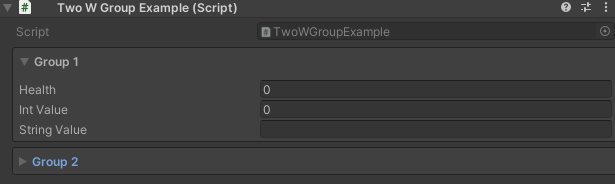
- WGroup & WGroupEnd - Boxed sections with optional collapse, auto-inclusion
→ Full Guide: Inspector Grouping Attributes
2. Inline Editing
Edit nested objects without losing context:
- WInLineEditor - Embed inspectors for ScriptableObjects, Materials, Textures directly below the field


→ Full Guide: Inspector Inline Editor
3. Method Invocation
Expose methods as clickable buttons in the inspector:
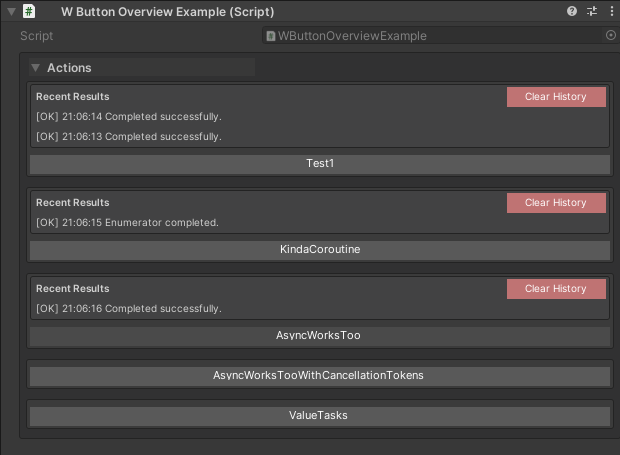
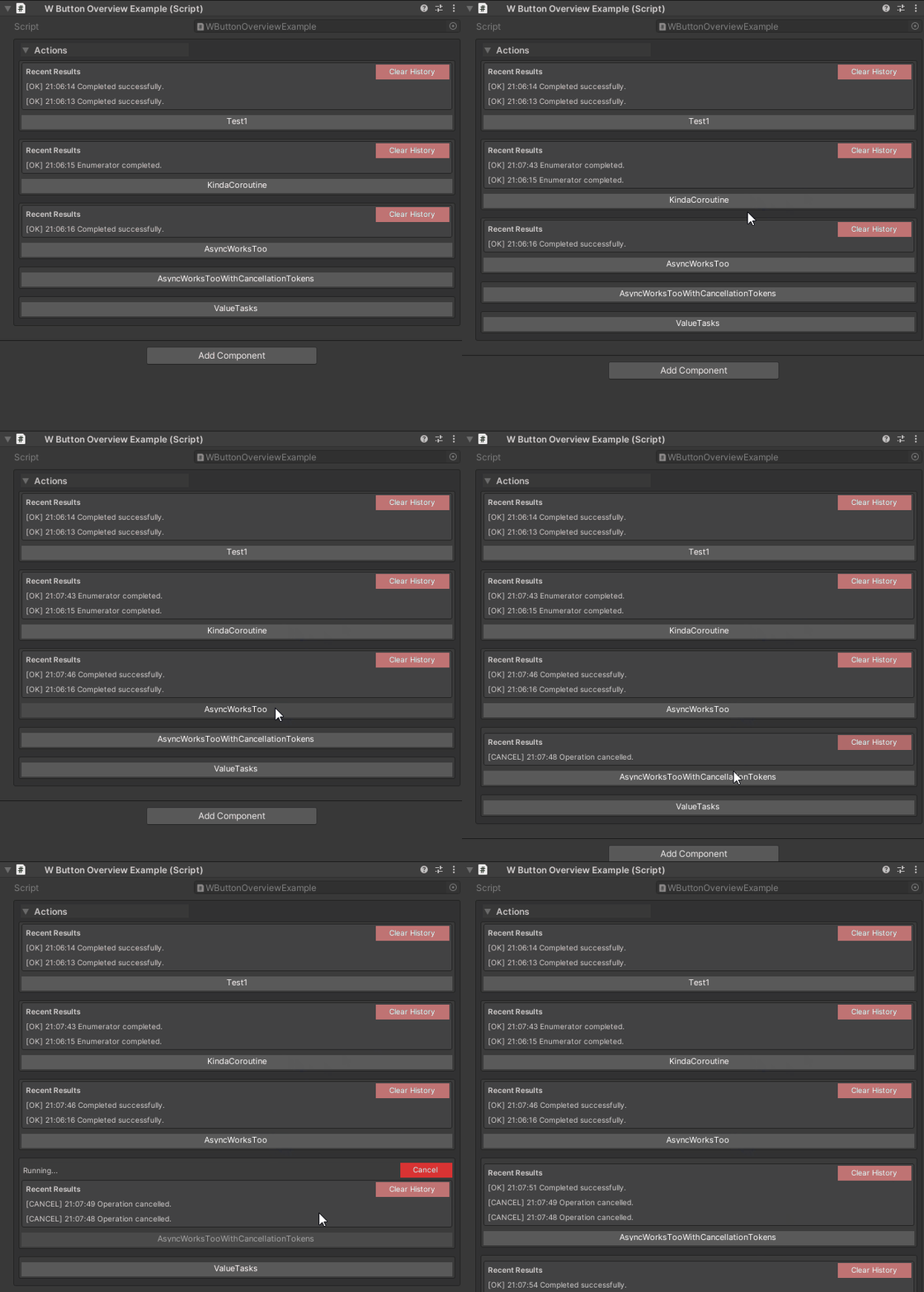
- WButton - One-click method execution with result history, async support, custom styling, grouping
→ Full Guide: Inspector Buttons
4. Conditional Display
Show or hide fields based on runtime values:
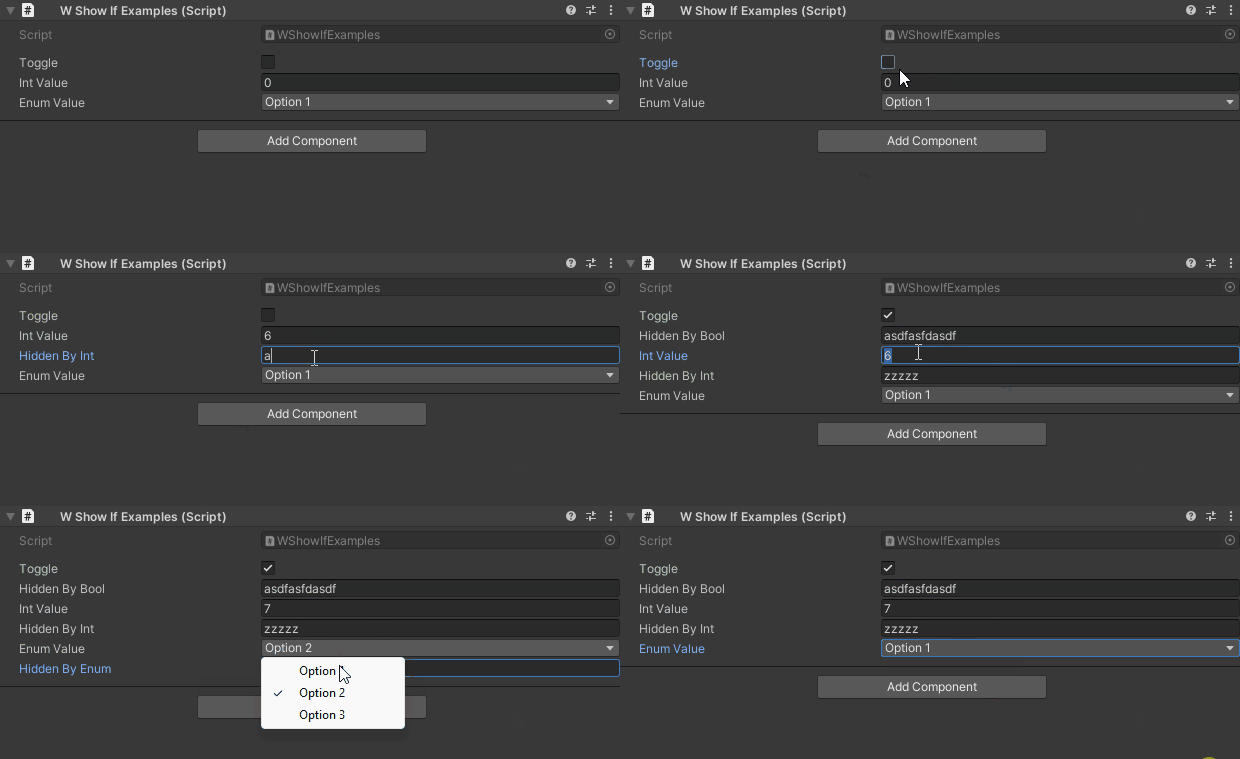
- WShowIf - Visibility rules with comparison operators (Equal, GreaterThan, IsNull, etc.), inversion, stacking
→ Full Guide: Inspector Conditional Display
5. Selection & Dropdowns
Provide designer-friendly selection controls:
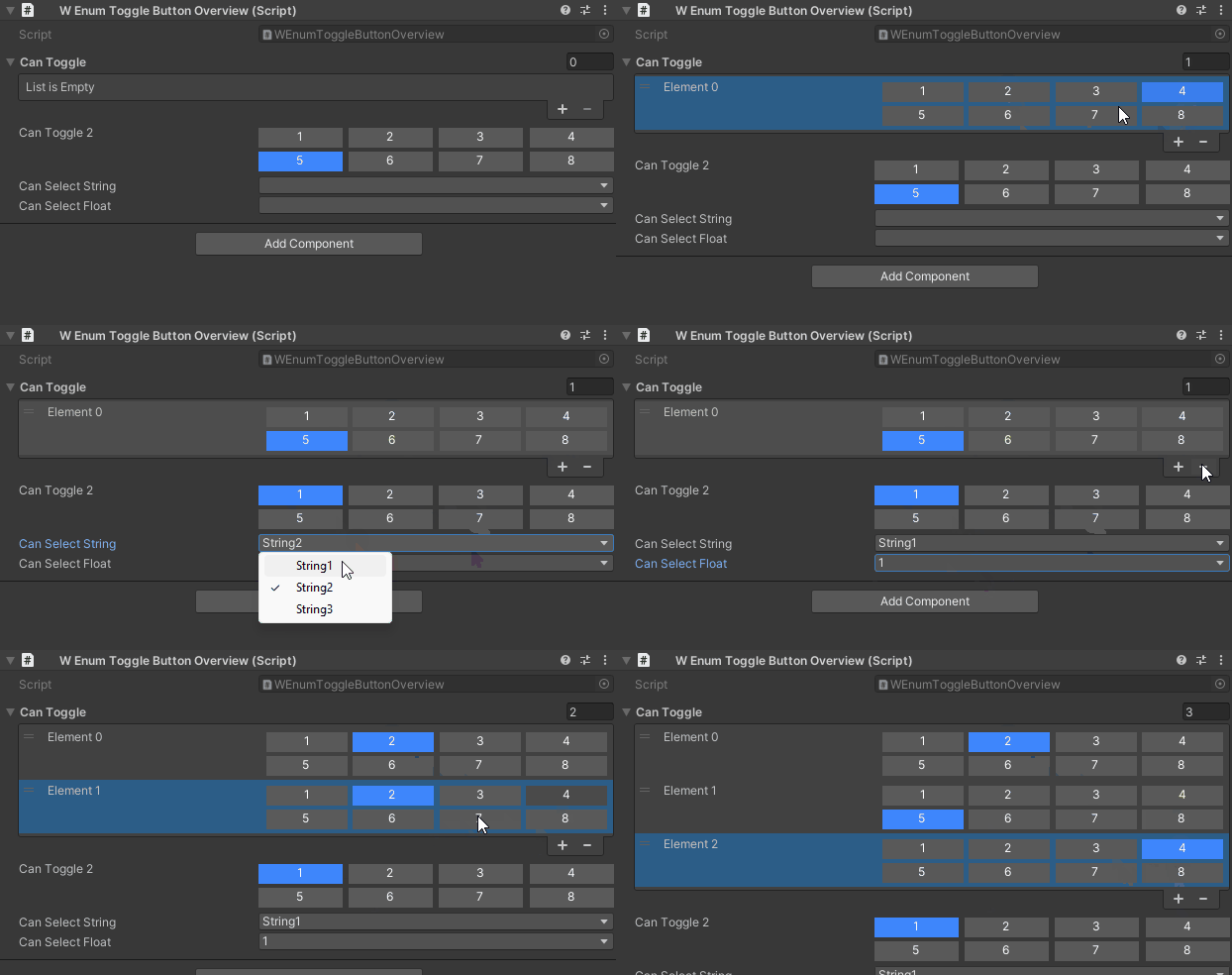
- WEnumToggleButtons - Visual toggle buttons for enums and flag enums
- WValueDropDown - Generic dropdown for any type
- IntDropDown - Integer selection from predefined values
- StringInList - String selection with search and pagination
→ Full Guide: Inspector Selection Attributes
6. Validation & Protection
Protect data integrity with validation attributes:
- WReadOnly - Display fields as read-only in the inspector
- WNotNull - Validate required references at runtime with
CheckForNulls()
→ Full Guide: Inspector Validation Attributes
7. Serialization Types
Unity-friendly wrappers for complex data:
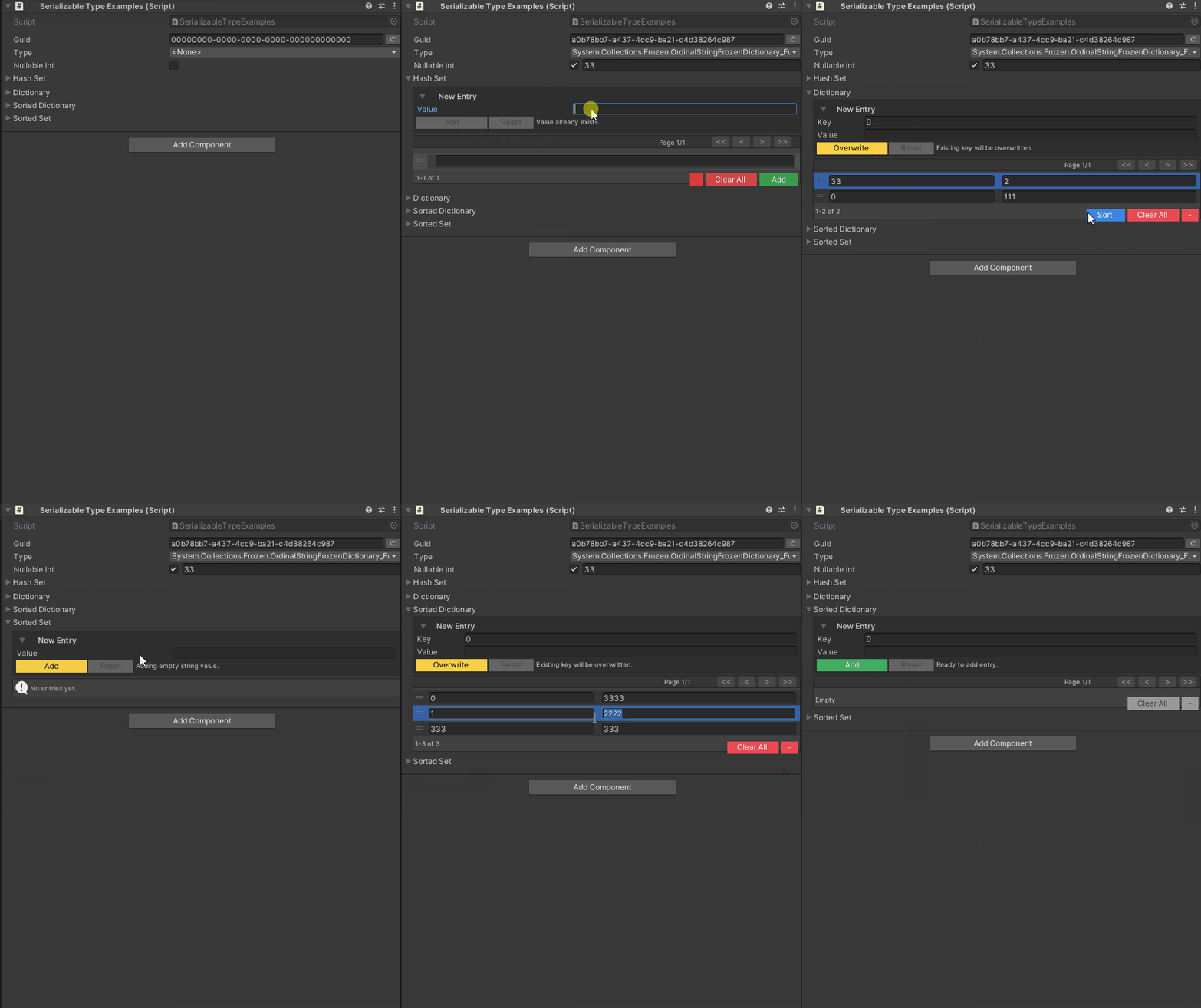
- WGuid - Immutable GUID using two longs (optimized for Unity serialization)
- SerializableDictionary - Key/value pairs with custom drawer
- SerializableSet - HashSet and SortedSet with duplicate detection, pagination, reordering
- SerializableType - Type references with assembly-move recovery
- SerializableNullable - Nullable value types
→ Full Guide: Serialization Types
8. Project Settings
Centralized configuration for all inspector features:
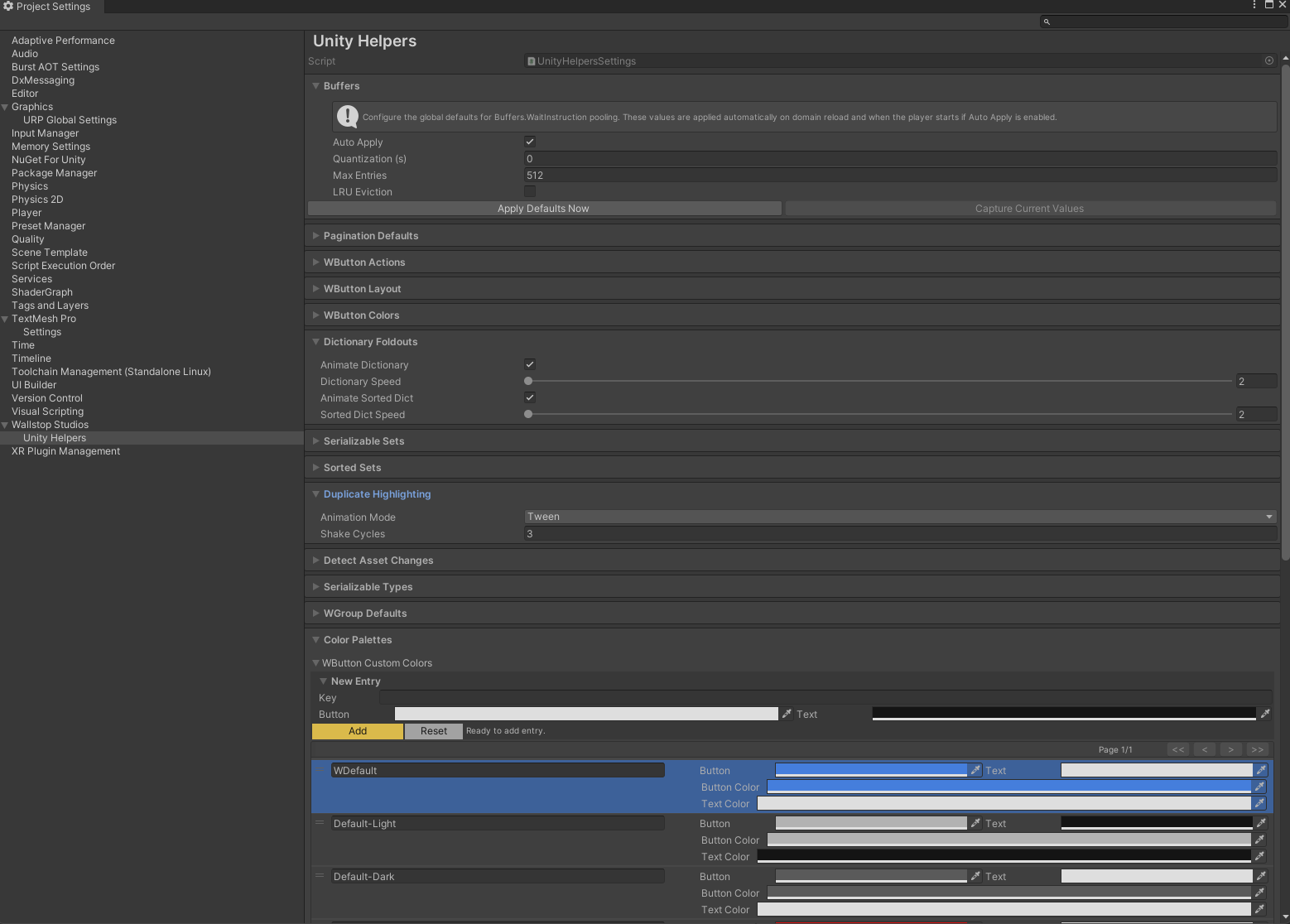
- UnityHelpersSettings - Global settings for pagination, colors, animations, history
Location: ProjectSettings/UnityHelpersSettings.asset
Settings:
- Pagination sizes (buttons, sets, dropdowns)
- Button placement and history capacity
- Color palettes for themes (light/dark/custom)
- Animation speeds for foldouts and groups
- Auto-include defaults
| C# | |
|---|---|

→ Full Guide: Inspector Settings
Quick Start Example
Here's a complete example showcasing multiple inspector features together:
For individual feature examples, see the detailed guides linked above.
Feature Comparison
| Feature | Unity Default | Odin Inspector | Unity Helpers |
|---|---|---|---|
| Grouping/Boxes | Custom Editor | [BoxGroup] | [WGroup] |
| Foldouts | Custom Editor | [FoldoutGroup] | [WGroup(collapsible: true)] |
| Method Buttons | Custom Editor | [Button] | [WButton] |
| Conditional Display | Custom Drawer | [ShowIf] | [WShowIf] |
| Enum Toggles | Custom Drawer | [EnumToggleButtons] | [WEnumToggleButtons] |
| Dictionaries | Not Supported | [ShowInInspector] | SerializableDictionary<K,V> |
| Sets | Not Supported | Custom | SerializableHashSet<T> |
| Type References | Not Supported | Custom | SerializableType |
| Nullable Values | Not Supported | Custom | SerializableNullable<T> |
| Color Themes | Not Supported | Built-in | Project Settings |
| Cost | Free | \(55-\)95 | Free (MIT) |
Design Philosophy
Declarative Over Imperative:
- Attributes describe what, not how
- No custom PropertyDrawers for common patterns
- Configuration over code
Designer-Friendly:
- Visual controls for visual people
- Reduce programmer bottlenecks
- Iteration without recompiling
Performance-Conscious:
- Uses cached reflection delegates to reduce overhead
- Uses pooled buffers for UI rendering to reduce allocations
- Aims to minimize GC allocations
Project-Consistent:
- Centralized settings asset
- Predictable behavior across all inspectors
Getting Started
-
Install Unity Helpers - See Installation Guide
-
Explore Examples - Check the guides linked above
-
Configure Settings - Open
ProjectSettings/UnityHelpersSettings.assetto customize pagination, colors, and animations -
Add Attributes - Start with
[WGroup]and[WButton]for immediate impact -
Use Serialization Types - Replace custom wrappers with
SerializableDictionary,SerializableSet, etc.
Detailed Documentation
Inspector Attributes
- Inspector Grouping Attributes - WGroup layout control
- Inspector Inline Editor - WInLineEditor for nested object editing
- Inspector Buttons - WButton for method invocation
- Inspector Conditional Display - WShowIf for dynamic visibility
- Inspector Selection Attributes - WEnumToggleButtons, WValueDropDown, IntDropDown, StringInList
- Inspector Validation Attributes - WReadOnly, WNotNull
Serialization
- Serialization Types - WGuid, SerializableDictionary, SerializableSet, SerializableType, SerializableNullable
Configuration
- Inspector Settings - UnityHelpersSettings asset reference
See Also
- Odin Inspector Migration Guide - Step-by-step migration from Odin Inspector
- Editor Tools Guide - 30+ automation tools for sprites, animations, validation
- Relational Components - Auto-wire components with attributes
- Effects System - Data-driven buffs/debuffs
- Main Documentation - Complete feature list
Next Steps:
Choose a guide based on what you want to learn first:
- Want organized inspectors? → Inspector Grouping Attributes
- Want method buttons? → Inspector Buttons
- Want conditional fields? → Inspector Conditional Display
- Want better selection controls? → Inspector Selection Attributes
- Want data validation? → Inspector Validation Attributes
- Want to serialize complex data? → Serialization Types