Serialization Types
Unity-friendly wrappers for complex data.
Unity Helpers provides serializable wrappers for types that Unity can't serialize natively: GUIDs, dictionaries, sets, type references, and nullable values. All types include custom property drawers for a consistent inspector experience and support JSON/Protobuf serialization.
Table of Contents
- WGuid
- SerializableDictionary
- SerializableHashSet & SerializableSortedSet
- SerializableType
- SerializableNullable
- SerializableValueTuple
- Best Practices
- Examples
WGuid
Immutable version-4 GUID wrapper using two longs for efficient Unity serialization.
Why WGuid?
- Problem: Unity doesn't serialize
System.Guiddirectly - Solution:
WGuidstores as twolongfields (_lowand_high) for fast Unity serialization
Use it when:
- You need a stable ID stored in a scene, prefab or ScriptableObject.
- You want to generate or inspect an ID in the Inspector.
- You need to convert between Unity-serialized data and
System.Guidwithout storing the ID as text.
A WGuid is an immutable 128-bit value. Keep an entity's existing ID when editing or loading it; generate a new one when creating a distinct entity.
Basic Usage
| C# | |
|---|---|
Visual Reference

Creating GUIDs
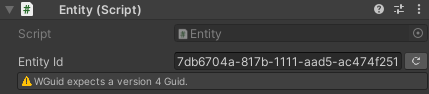
Inspector Features
Custom Drawer:
- Text field displays GUID in standard format
- "Generate" button creates new GUID
- Validation warns if GUID is not version-4
- Undo/redo support


Conversions
| C# | |
|---|---|
Equality & Comparison
| C# | |
|---|---|
Serialization Support
- Unity: Serialized as two
longfields - JSON: Serialized as GUID string
- Protobuf: Serialized as two
longfields
| C# | |
|---|---|
SerializableDictionary
Unity-friendly dictionary with synchronized key/value arrays and custom drawer.
Why SerializableDictionary?
- Problem: Unity doesn't serialize
Dictionary<TKey, TValue> - Solution:
SerializableDictionary<TKey, TValue>maintains synchronized arrays for Unity serialization and a runtime dictionary for fast lookups
Basic Usage
Inspector Features
Visual Reference
Dictionary inspector showing key-value pairs with pagination and inline editing
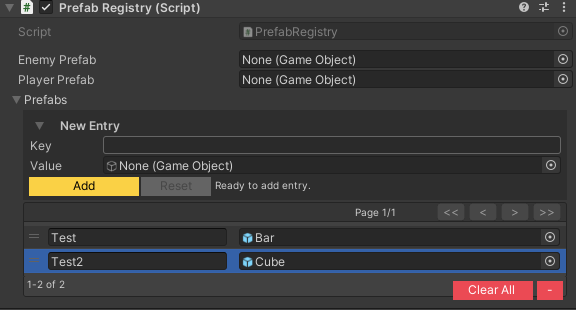
Custom Drawer:
- Key/value pair editing
- Add/Remove buttons
- Reorderable list
- Duplicate key detection (visual warning)
- Null value highlighting
- Pagination for large dictionaries
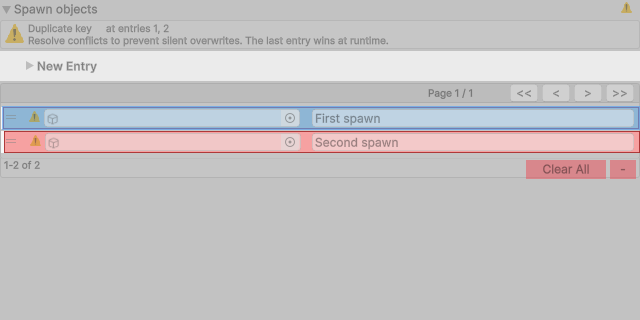
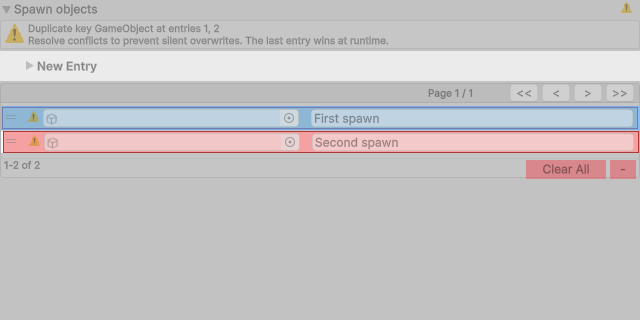
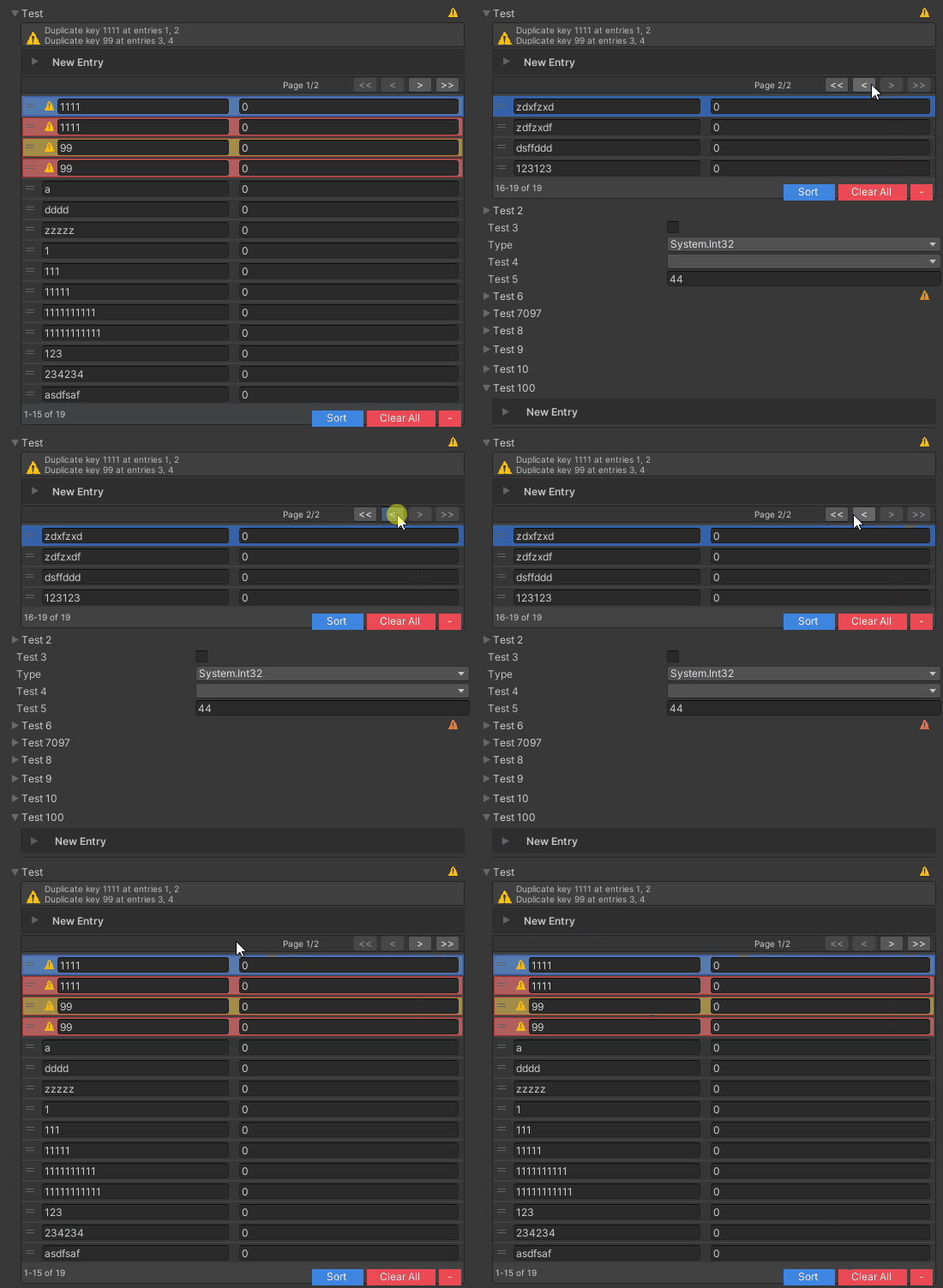
Duplicate warnings show the type name when a Unity object's name is empty or contains only whitespace. Padded object names keep their exact text. The display fallback preserves object references and literal string keys; distinct keys remain distinct even when their warning labels match.
These captures use the same object twice, with a whitespace-only name:
| Before | After |
|---|---|
 |  |
Dictionary Operations
Specialized Dictionaries
| C# | |
|---|---|
Note: SerializableSortedDictionary uses SortedDictionary<TKey, TValue> internally for ordered keys.
Collection Values
A dictionary whose value type is itself a collection just works. No wrapper type, no cache subclass, no consumer change:
This holds for List<T> and T[] values, on both SerializableDictionary and SerializableSortedDictionary.
How it works, and why your existing assets are unaffected
Unity does not serialize a nested collection: the serialized values array would be a List<float>[], which Unity drops entirely, while the parallel keys array survives because it is a plain string[]. Rather than asking you to change the value type, the dictionary writes those values to a second serialized array whose elements are one-field boxes (the indirection Unity wants) and unpacks them on load.
That second array is populated only for value types Unity would otherwise drop. Every other dictionary keeps storing its values exactly where it always did, so no existing data is rewritten and assets written by this version stay readable by older package versions. Because a serialized field cannot be declared conditionally, dictionaries do gain one empty array in their serialized form; the first save after upgrading adds that line to affected assets and nothing else.
Nesting these inside each other
A serializable collection whose value or element is another serializable collection type has never needed any of this, and still does not:
| C# | |
|---|---|
The reason is the same one the boxing exploits: SerializableDictionary<int, float> is a [Serializable] class, and Unity has always accepted a class as an array element. Only a raw List<T> or T[] in that position is refused, and that is exactly the case the boxing now covers, so the two mechanisms compose:
| C# | |
|---|---|
The depth limit is Unity's, not this package's. Unity stops descending after a fixed number of nesting levels and warns rather than saving the remainder, and each dictionary in a chain costs roughly two of those levels. Three dictionaries deep is covered by tests; arbitrarily deep recursion is not something a wrapper can rescue, so if you find yourself approaching it, flatten the data: a composite key is usually the answer:
| C# | |
|---|---|
Sets are different
SerializableHashSet<List<T>> still reports the shape as unsupported. That is deliberate rather than pending: List<T> has reference equality, so a set of lists treats two lists with identical contents as two distinct elements, and deserializing one never reproduces the set you saved. Use SerializableHashSet<SerializableList<T>> only if you genuinely want identity semantics: the wrapper serializes, but it declares no value equality either, so Contains on a restored set is still false for an equal-content list. Otherwise the element type is the thing to reconsider.
SerializableSortedSet<List<T>> does not arise at all: SerializableSortedSet<T> constrains T : IComparable<T>, and List<T> does not implement it, so the declaration is a compile error rather than something the Inspector has to report.
SerializableList<T> remains available and is still the right choice when you want a list that draws and serializes on its own, outside a dictionary. It implements IList<T>, converts implicitly to and from List<T>, and exposes AsList() for the List<T> members it does not surface (Sort, BinarySearch). It draws in the Inspector as the list it wraps, with no extra foldout, and serializes to a plain JSON array.
Value types that are still unsupported
Interfaces, abstract types, Dictionary<,>, and classes without [Serializable] cannot be serialized by Unity in any container, so no wrapper repairs them. The Inspector reports those as an error rather than drawing a value column that persists nothing, so it is visible while authoring instead of at runtime.
The three-argument cache form is still supported for a value type you want to route explicitly:
| C# | |
|---|---|
Serialization Support
- Unity: Synchronized
_keysand_valuesarrays - JSON: Standard dictionary format
- Protobuf: Supported via surrogates
| C# | |
|---|---|
SerializableHashSet & SerializableSortedSet
Unity-friendly set collections with duplicate detection and custom drawers.
Why Serializable Sets?
- Problem: Unity doesn't serialize
HashSet<T>orSortedSet<T> - Solution:
SerializableHashSet<T>andSerializableSortedSet<T>maintain a serialized array and runtime set for fast lookups
Basic Usage
| C# | |
|---|---|
Visual Reference
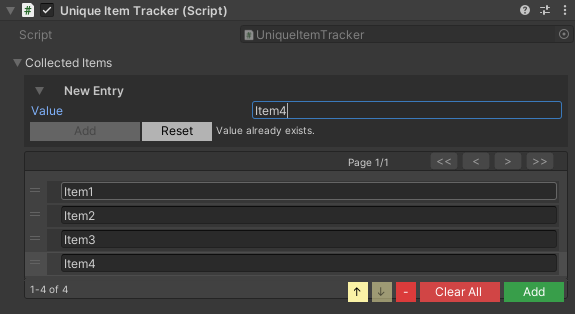
Set inspector with add/remove controls, duplicate highlighting, and pagination
Inspector Features
Custom Drawer:
- Reorderable list
- Add/Remove/Clear/Sort buttons
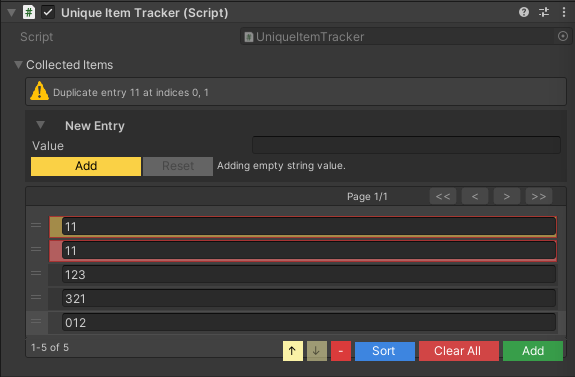
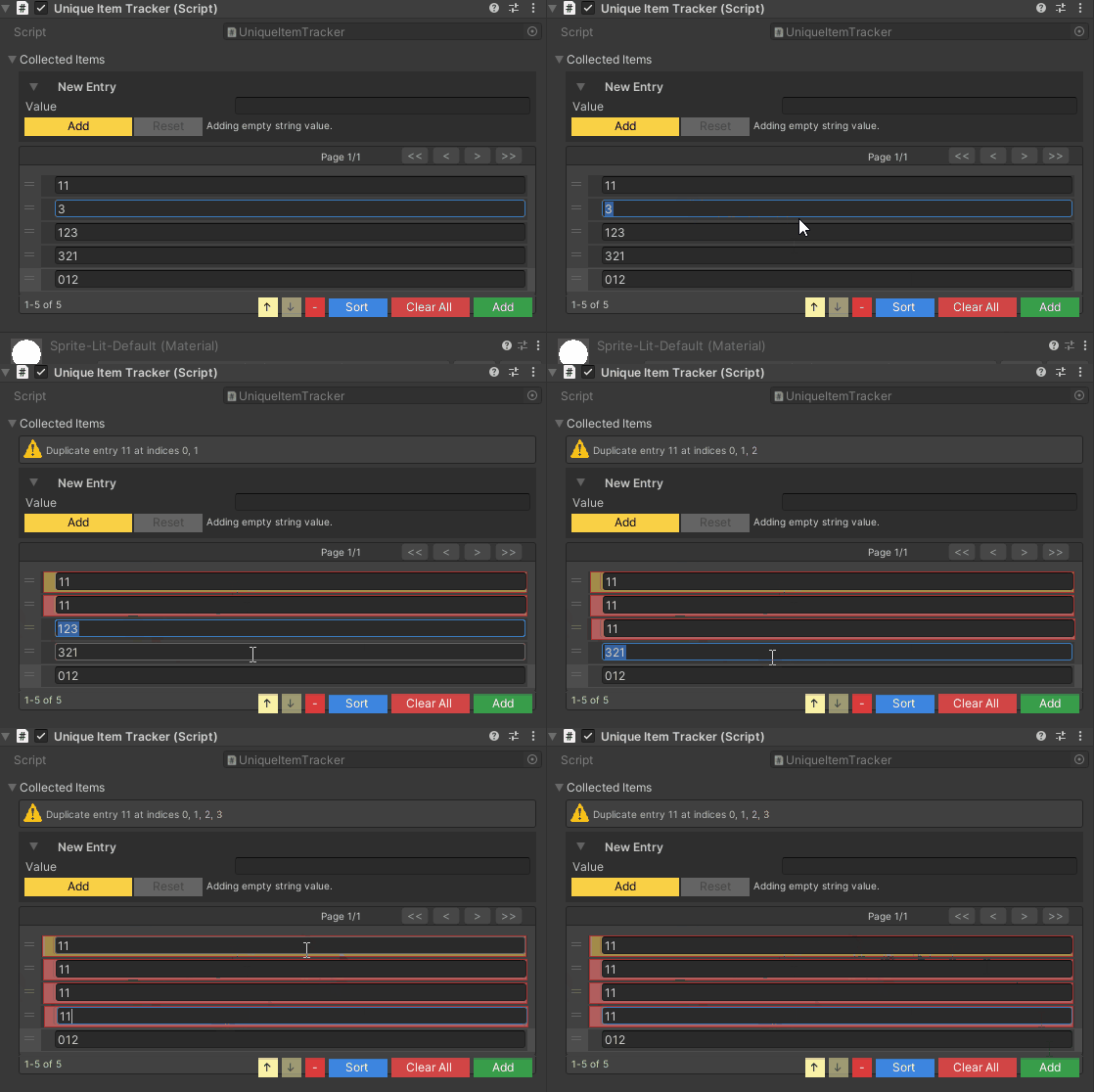
- Duplicate detection with visual highlighting (shake animation + color)
- Null entry highlighting (red background)
- Pagination for large sets
- Move Up/Down buttons
- Current selection badge for items on other pages
- New Entry foldout to stage values before adding them to the runtime set (tune its animation via Project Settings ▸ Wallstop Studios ▸ Unity Helpers ▸ Set Foldouts)
Visual Reference
Visual feedback for duplicate entries (yellow shake) and null values (red background)
Set Operations
New Entry Foldout
Expandable "New Entry" controls let you configure the exact value that will be inserted, which is especially helpful for complex structs, managed references, or ScriptableObjects. The foldout supports the same field variety as the inline list and respects your duplicate/null validation. Animation for the New Entry foldout is governed by the Serializable Set Foldouts settings; adjust tweening and speed independently for SerializableHashSet<T> and SerializableSortedSet<T>.
Foldout Defaults & Overrides
By default, SerializableSet inspectors start collapsed until you open them. This baseline comes from Project Settings ▸ Wallstop Studios ▸ Unity Helpers via the Serializable Set Start Collapsed toggle (and the equivalent Serializable Dictionary Start Collapsed toggle for dictionaries). You can override the default per-field with [WSerializableCollectionFoldout]:
| C# | |
|---|---|
- Project setting establishes the initial state only.
[WSerializableCollectionFoldout]can request expanded or collapsed behavior for specific collections.- Explicit changes to
SerializedProperty.isExpanded(scripts, custom inspectors, or tests) take ultimate precedence. The drawer now respects those manual decisions, so opting-in via code no longer gets undone by the attribute or the global default.
The attribute applies to both SerializableHashSet<T>/SerializableSortedSet<T> and the dictionary equivalents, making it straightforward to mix project-wide defaults with per-field intentions.
Sorted Sets
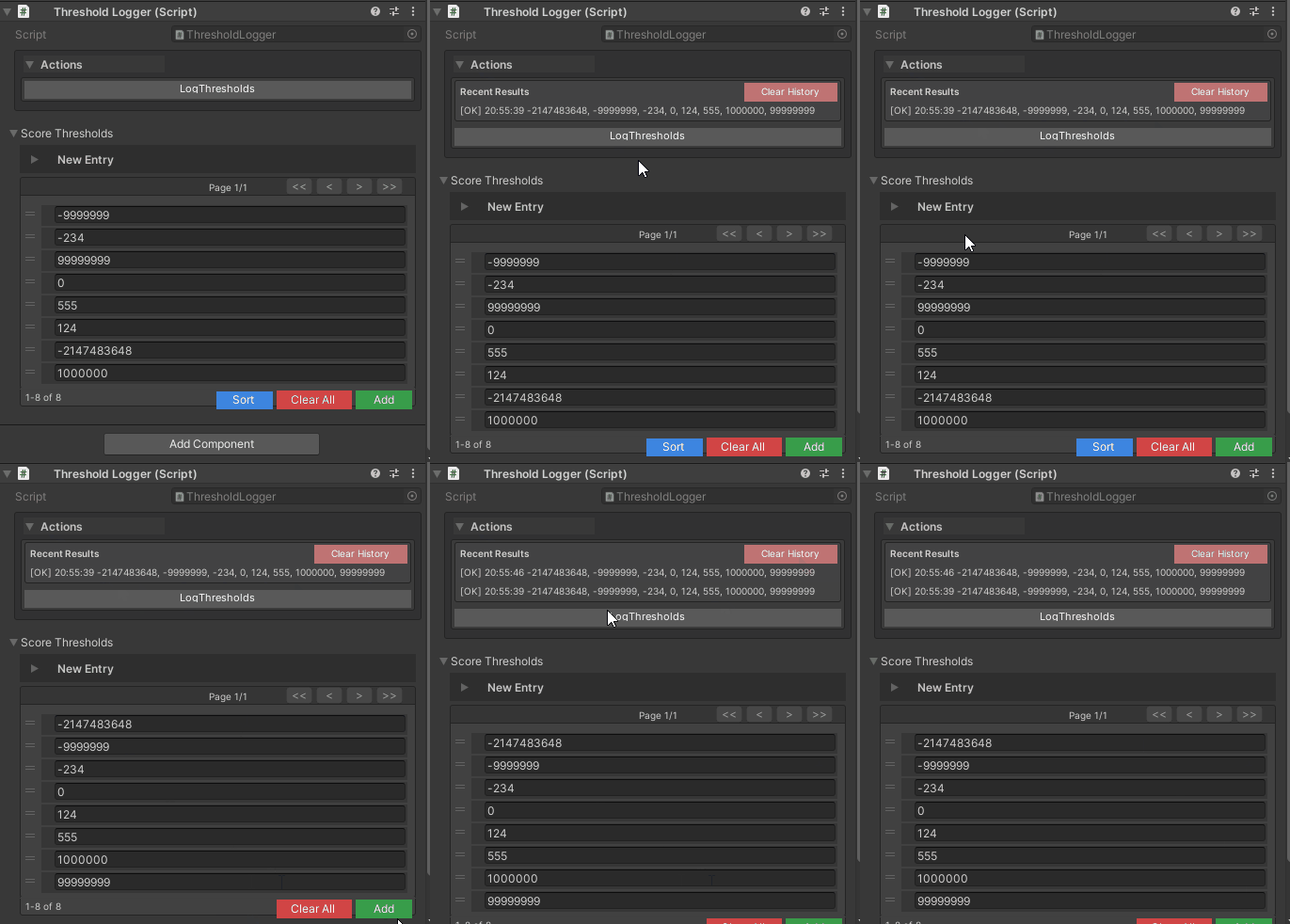
Serialization Support
- Unity: Serialized
_itemsarray - JSON: Array format
- Protobuf: Supported via collection surrogates
SerializableType
Unity-friendly type reference that can resolve types moved between assemblies when their full names stay the same.
| C# | |
|---|---|
Visual Reference
Type selection with searchable dropdown, namespace filtering, and validation
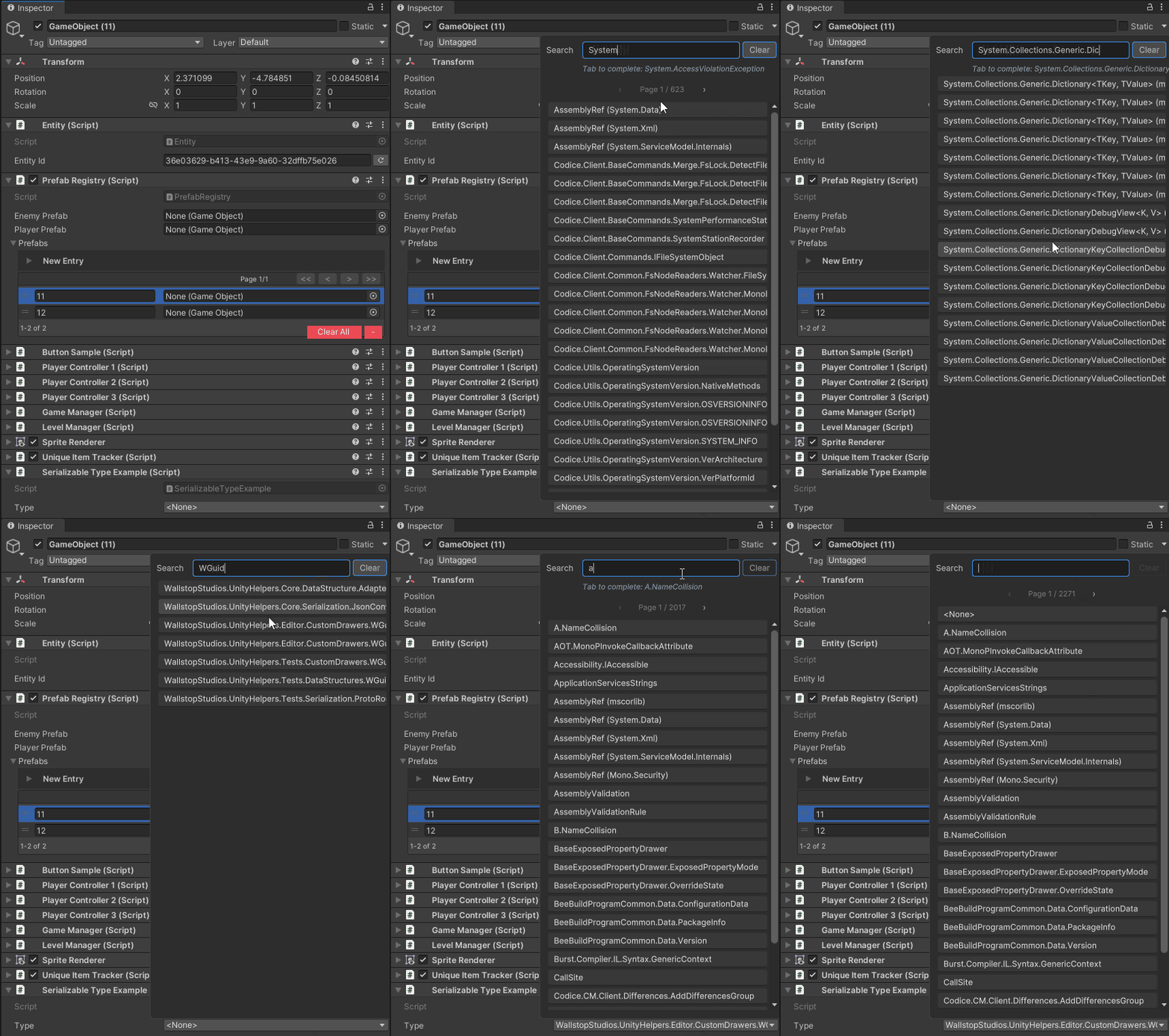
Why SerializableType?
- Problem: Unity doesn't serialize
System.Type, and stored type names can break when an assembly changes - Solution:
SerializableTypestores assembly-qualified names and searches loaded assemblies for matching full type names
Basic Usage
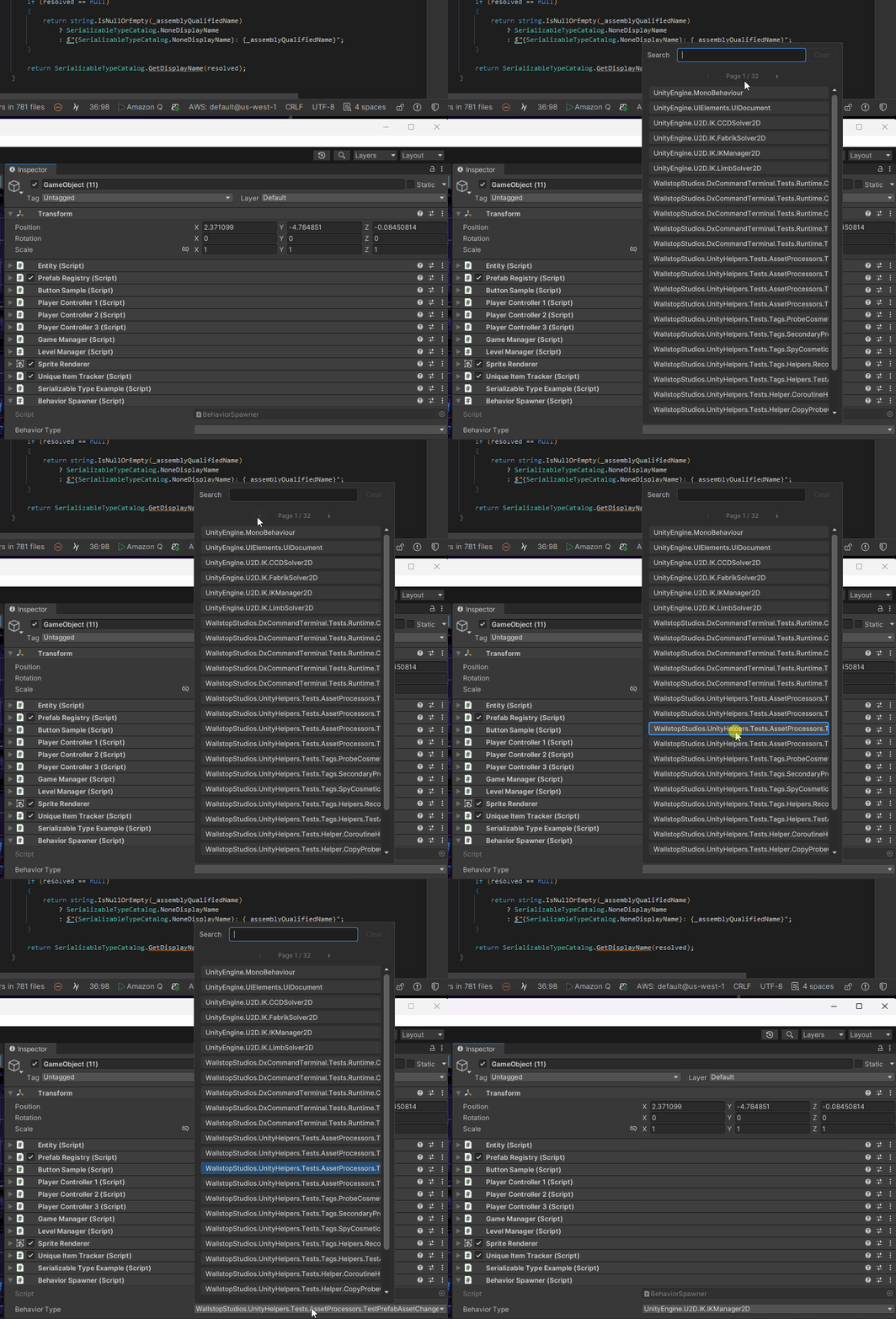
Inspector Features
Custom Drawer (Two-Line):
- Search row: Text field for filtering types
- Popup row: Dropdown showing matched types
- Clear button to unset the type
- Pagination for large type catalogs
- Auto-complete suggestions
Search result caching. SerializableTypeCatalog.GetFilteredDescriptors caches its answer per search term, and reuses a shorter term's result as the starting set for a longer one, so typing a name does not rescan the whole catalog on every keystroke. The cache holds at most SerializableTypeCatalog.MaxCachedFilterResults terms (default 64) and evicts the least recently used one past that -- each entry is a filtered slice of every type in the project, and the shortest terms are the largest, so an unbounded cache retained one array per prefix of everything ever typed (#694). Eviction only costs a wider rescan; the results are identical. Set it to 0 or less to remove the bound. Changing the property resizes the live shared Cache<string, SerializableTypeDescriptor[]>; shrinking evicts least-recently-used results immediately.
Ignore-pattern match counts are computed only when the Unity Helpers settings window displays them. Normal editor startup and domain reloads apply the patterns without scanning every loaded type for counts that are not visible.
Resolving a stored type name does not build the type-picker catalog. A missing type returns null without a full catalog scan.
Type Operations
Assembly Moves
Scenario: You move PlayerController to another assembly without changing its namespace or name.
- Standard Approach: Type reference breaks, data loss
- SerializableType: Searches loaded assemblies for the same full type name
How it works:
- Stores assembly-qualified name (e.g.,
Namespace.PlayerController, Assembly-CSharp) - On deserialization, tries exact match first
- If the exact match fails, it scans assemblies for the same full type name
- Stores the new assembly name on the next Unity serialization; JSON and Proto keep the original stored name
Constructed generic types can also recover when their component types have unique full names in loaded assemblies. Renaming a type or changing its namespace changes the full name and needs an explicit migration.
Serialization Support
- Unity: Stores assembly-qualified name string
- JSON: Type name string with custom converter
- Protobuf: Supported via string surrogates
SerializableNullable
Unity-friendly nullable value type wrapper.
Why SerializableNullable?
- Problem: Unity doesn't serialize
Nullable<T>(e.g.,int?,float?) - Solution:
SerializableNullable<T>wraps any value type withHasValueandValueproperties
Basic Usage

Inspector Features
Custom Drawer:
- Checkbox for
HasValuestate - Inline value field (enabled when
HasValue == true) - Height adapts based on the nullable state
Nullable Operations
Use Cases
Optional Configuration:
| C# | |
|---|---|
Conditional Bonuses:
| C# | |
|---|---|
Dynamic Properties:
| C# | |
|---|---|
Serialization Support
- Unity: Stores
_hasValuebool and_valueT fields - JSON: Standard nullable format
- Protobuf: Supported via nullable surrogates
| C# | |
|---|---|
SerializableValueTuple
Unity-friendly stand-in for ValueTuple, in two- and three-component forms.
Why SerializableValueTuple?
- Problem: Unity does not serialize
(int, float), and it fails silently. There is noSerializedPropertyfor the field at all, so a tuple inside aSerializableDictionaryor aList<T>loses whatever you authored with nothing to report it.[Serializable]on the type is not the obstacle (ValueTuple<,>already carries it); Unity declines every type out of the framework assemblies. - And it is worse in a player.
Serializer.ProtoSerialize((7, 1.5f))andSerializer.JsonStringify((7, 1.5f))both work in the editor and both throwExecutionEngineExceptionon an IL2CPP standalone build: protobuf-net'sStructValueChecker<ValueTuple<int, float>>and System.Text.Json'sObjectDefaultConverter<ValueTuple<int, float>>are instantiated reflectively, so no AOT code is generated for them. Measured on Unity 2021.3. A tuple therefore looks serializable right up until you ship. - Solution:
SerializableValueTuple<T1, T2>andSerializableValueTuple<T1, T2, T3>: the same components under a name Unity will serialize, with implicit conversions in both directions so(T1, T2)stays the spelling everywhere else.
Basic Usage
Interchangeable with ValueTuple
The field names and numbers are ValueTuple's own, so payloads written with either read back through the other: an existing save migrates without a rewrite:
| C# | |
|---|---|
Verified byte-identical for protobuf (0807150000C03F either way) and character-identical for JSON ({"Item1":7,"Item2":1.5}).
Both directions work in a player for protobuf, so an existing save migrates either way.
Tuples serialize on IL2CPP
You do not have to adopt the stand-in to fix protobuf. The package ships
| C# | |
|---|---|
so the generator emits an ahead-of-time formatter for every closed ValueTuple your build actually uses, and Serializer.ProtoSerialize((7, 1.5f)) goes through it instead of protobuf-net's reflection. The bytes are SerializableValueTuple's by construction, so the tuple and the stand-in cannot drift apart. Protobuf only; see the JSON caveat above.
The stand-in is still what you need for a serialized field, because that is Unity's own serializer rather than ours.
Turning it off
Define WALLSTOP_DISABLE_VALUE_TUPLE_SERIALIZATION in Player Settings → Scripting Define Symbols to remove both. It is on by default because a tuple that throws only in a player is the worst failure this package has to offer, but it is not free: the generator emits one formatter per closed ValueTuple your build uses, and a tuple is a common local aggregate rather than a deliberate container. On this package alone that is 41 registrations, 11 of them closing over types that can never serialize (Type, ConstructorInfo, …). Those decline at run time, but under IL2CPP each closure is still compiled code.
An inaccessible two- or three-element tuple used only as a local aggregate is skipped by the built-in formatter scan without a warning. A tuple used as a serialized member or passed to the serialization facade still produces WPROTO028 if its private argument types prevent the generated registrar from naming it. Explicit root-marshal and custom formatter registrations retain their warnings, as do JSON converter registrations.
Turning it off does not affect SerializableValueTuple; the stand-in keeps its own converter and its generated formatter either way. Only the automatic support for the raw framework tuple goes.
Conversions
Equals and GetHashCode use EqualityComparer<T>.Default, so a null component is safe rather than a throw.
Higher arities
Only two and three components ship. They cover the gameplay cases ((item, count), (min, max), (x, y, z)), and each additional arity is public API to maintain forever. If you need more, a [Serializable] struct with named fields is clearer at that size anyway.
Best Practices
1. Choose the Right Type
2. Initialize Collections
3. Use Sorted Variants for Ordered Data
4. Handle WGuid Generation Carefully
Examples
Example 1: Item Database with Dictionary
Example 2: Player Achievement Tracking
Example 3: Dynamic Behavior Spawning
Example 4: Optional Configuration with Nullable
See Also
- Inspector Overview - Complete inspector features overview
- Serialization Guide - JSON/Protobuf serialization
- Data Structures - Other data structures
- Editor Tools Guide - Editor utilities
Next Steps:
- Replace string/int-based IDs with
WGuid - Use
SerializableDictionaryinstead of parallel arrays - Track unique collections with
SerializableHashSet - Store type references with
SerializableType - Add optional configuration with
SerializableNullable