2D Spatial Trees: Concepts and Usage
This practical guide complements performance and semantics pages with diagrams and actionable selection advice.
TL;DR: What Problem This Solves
- You often need to answer: "What's near X?" or "What's inside this area?"
- ⭐ Naive loops are O(n): check every object. Spatial trees are O(log n): only check nearby objects.
- Result: 10-100x faster queries, scaling from dozens to millions of objects.
The Scaling Advantage
| Object Count | Naive Approach (checks) | Spatial Tree (checks) | Speedup |
|---|---|---|---|
| 100 | 100 | ~7 | 14x |
| 1,000 | 1,000 | ~10 | 100x |
| 10,000 | 10,000 | ~13 | 769x |
| 100,000 | 💀 Unplayable | ~17 | ∞ |
Quick picks
- Many moving points, frequent rebuilds, broad searches: QuadTree2D
- Static points, nearest‑neighbor/k‑NN: KdTree2D (Balanced)
- Fast builds with good‑enough queries on points: KdTree2D (Unbalanced)
- Objects with size (bounds), intersect/contain queries: RTree2D
Quick Start (Code)
Points (QuadTree2D / KdTree2D)
Sized objects (RTree2D)
Notes
- These trees are immutable: rebuild when positions/bounds change significantly.
- For lots of moving points, consider
SpatialHash2Dfor broad‑phase. - See Spatial Tree Semantics for boundary behavior and edge cases.
⭐ Zero-Allocation Queries: The Performance Killer Feature
The Problem - GC Spikes Every Frame:
| C# | |
|---|---|
The Solution - Buffering Pattern:
Impact:
- Before: GC spikes every 2-3 seconds, frame drops to 40fps
- After: Zero GC from queries, stable 60fps even with 1000s of queries/second
All spatial trees support this pattern:
QuadTree2D.GetElementsInRange(pos, radius, buffer)KdTree2D.GetElementsInBounds(bounds, buffer)RTree2D.GetElementsInRange(pos, radius, buffer)
💡 Pro Tip: Pre-size your buffers based on expected max results.
new List<Enemy>(64)avoids internal resizing for results up to 64 items.
Maximum Ergonomics:
These APIs return the buffer you pass in, so you can use them directly in foreach loops:
| C# | |
|---|---|
Using Pooled Buffers:
Don't want to manage buffers yourself? Use the built-in pooling utilities:
See Buffering Pattern for the complete guide and Pooling Utilities for more pooling options.
Structures
QuadTree2D
- Partition: Recursively splits space into four quadrants.
- Use for: Broad-phase proximity, view culling, general spatial bucketing.
- Pros: Simple structure; predictable performance; incremental updates straightforward.
- Cons: Data hotspots deepen local trees; nearest neighbors slower than KDTree.
Diagram: 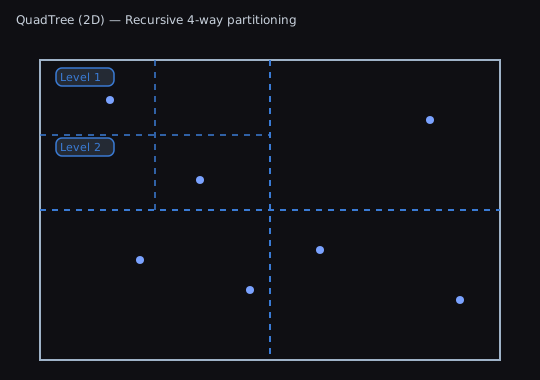
KDTree2D
- Partition: Alternating axis-aligned splits (x/y), often median-balanced.
- Use for: Nearest neighbor, k-NN, range queries on points.
- Pros: Strong NN performance; balanced variant gives consistent query time.
- Cons: Costly to maintain under heavy churn; unbalanced variant can degrade.
Diagram: 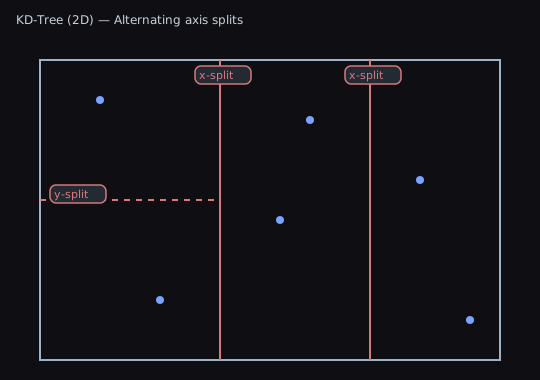
RTree2D
- Partition: Groups items by minimum bounding rectangles (MBRs) with hierarchical MBRs.
- Use for: Items with size (AABBs): sprites, tiles, colliders; bounds intersection.
- Pros: Great for large bounds queries; matches bounds semantics.
- Cons: Overlapping MBRs can increase node visits; not optimal for point NN.
Diagram: 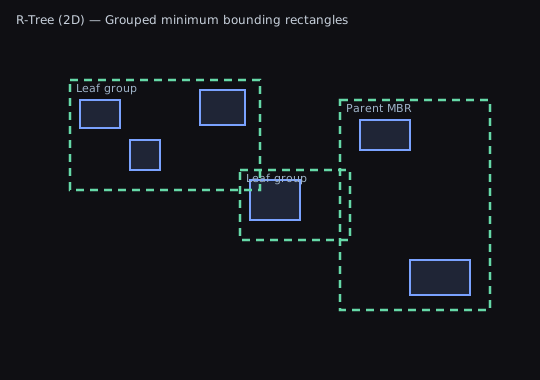
Choosing a Structure
Use this decision flowchart to pick the right spatial tree:
Quick Reference
- Many moving points, rebuild or frequent updates: QuadTree2D
- Nearest neighbors on static points: KDTree2D (Balanced)
- Fast builds with good-enough queries: KDTree2D (Unbalanced)
- Objects with area; bounds queries primary: RTree2D
- Very frequent movement (every frame): SpatialHash2D (see README)
Query Semantics
- Points vs. Bounds: QuadTree2D and KDTree2D are point-based; RTree2D is bounds-based.
- Boundary inclusion: normalize half-open vs. closed intervals. Add epsilons for edge cases.
- Numeric stability: prefer consistent ordering for collinear and boundary points.
- Results are a multiset, and the destination list is cleared exactly once. A negative or
NaNradius, or a nonfinite query center, returns that cleared empty list; a+Infinityradius is supported. Nearest-neighbor excludes NaN distances and returnsmin(count, eligibleElementCount)entries ordered by distance and then insertion index; which equidistant elements are in that set differs by family. Constructors exclude non-finite stored positions or bounds edges from the index while retaining the originalelementssnapshot and source identities. See Query Contract for the full table.
For deeper details, performance data, and diagrams, see: