Core Math & Extensions
TL;DR: Why Use These
- Small helpers that fix everyday math and Unity annoyances: safe modulo, wrapped indices, approximate equality, bounds math, color utilities, and more.
- Copy/paste examples and diagrams show intent; use as building blocks in hot paths.
This guide summarizes the math primitives and extension helpers in this package and shows how to apply them effectively, with examples, performance notes, and practical scenarios.
Contents
- Numeric helpers: Positive modulo, wrapped arithmetic, approximate equality, clamping
- Geometry: Lines, ranges, parabolas, point-in-polygon, polyline simplification
- Unity extensions: Rect/Bounds conversions, RectTransform bounds, camera bounds, bounds aggregation
- Color utilities: Averaging (LAB/HSV/Weighted/Dominant), hex conversion
- Collections: IEnumerable helpers, buffering, infinite sequences
- Strings: Casing, encoding/decoding, distance
- Direction helpers: Enum conversions and operations
- Enum helpers: Zero-allocation flag checks, cached names, display names
- Random generators: Weighted selection, vector generation, subset sampling
- Async/Coroutine interop: Bridge Unity AsyncOperation with async/await
- Best Practices
Numeric Helpers
- Positive modulo and wrap-around arithmetic
- Use
PositiveModto ensure non-negative modulo results for indices and cyclic counters. - Use
WrappedAdd/WrappedIncrementfor ring buffer indexes and cursor navigation. - Both come in
int,long,floatanddouble, so an angle or a normalized phase wraps with the same call a ring-buffer cursor does. Every one of them returns a value in[0, max)for any input, including sums that overflow their own type.
Example:
Diagram (wrap-around on a ring of size 5):
- Approximate equality
float.Approximately(rhs, tolerance)anddouble.Approximatelyadd a magnitude-scaled fudge factor.
Example:
| C# | |
|---|---|
- Generic
Clamp Clamp<T>(min, max)works for anyIComparable<T>.
Geometry
Line2D: 2D line segment operations
Why it exists: Provides 2D line segment math for collision detection, ray-casting, and geometric queries.
When to use:
- Ray-casting for bullets, lasers, or line-of-sight checks
- Detecting if paths cross obstacles
- Click detection near edges or borders
- Finding closest points on paths or walls
When NOT to use:
- For 3D geometry (use Line3D instead)
- For curves or arcs (lines are always straight)
Example:
| C# | |
|---|---|
Diagram (segment intersection):
| Text Only | |
|---|---|
Getting the exact intersection point:
| C# | |
|---|---|
Circle intersection (bullets hitting circular enemies):
Intersects answers whether any part of the segment is inside or on the circle. Use TryGetIntersectionPoint when you need the first point on the circumference, ordered from bulletStart toward bulletEnd. A path wholly inside the circle intersects its area but does not cross its circumference. TryGetIntersectionPoint rejects negative radii, while Intersects retains its existing radius-squared behavior.
| C# | |
|---|---|
Closest point on line (snapping to paths):
| C# | |
|---|---|
Performance tip: Use DistanceSquaredToPoint instead of DistanceToPoint when comparing distances (avoids expensive square root):
| C# | |
|---|---|
Line3D: 3D line segment operations
Why it exists: Extends Line2D concepts to 3D space for sphere intersection, bounding box clipping, and skew line distance.
When to use:
- 3D ray-casting for weapons, lasers, or grappling hooks
- Visibility checks between 3D objects
- Cable/rope collision detection
- Finding closest approach between moving objects
When NOT to use:
- For 2D games (use Line2D instead)
- For complex curved paths (lines are always straight)
Basic operations:
| C# | |
|---|---|
Closest points between two 3D lines (skew lines):
Problem: In 3D, two lines might not actually intersect (imagine two pipes that pass by each other). This finds the closest approach.
| C# | |
|---|---|
Sphere intersection (force fields, explosions):
| C# | |
|---|---|
Comparing shapes: Equals is exact, ApproximatelyEquals is not
Circle, Sphere, Line2D and Line3D compare every component exactly, so anything Equals reports equal also shares a hash code and survives a Dictionary or HashSet round trip. An approximate Equals cannot: the hash would still be computed from the exact bits, and a value could vanish from the set it had just been added to.
For a shape that was computed rather than authored, state the tolerance:
| C# | |
|---|---|
Every component -- both centre axes and the radius, or every endpoint coordinate -- must agree within the tolerance, and the tolerance is the whole of the permitted difference: nothing proportional to the magnitudes is added on top, so tolerance: 0f is an exact comparison whether the values are near zero or near a million. A negative, infinite, or NaN tolerance is not a comparison anyone meant to make, so it returns false rather than being coerced to something.
A non-finite component -- an infinite radius, a NaN endpoint -- compares exactly instead. Identical infinities are approximately equal and mismatched ones never are, so a shape is always approximately equal to itself.
Range: Numeric ranges with flexible boundaries
Why it exists: Solves the "is this value in a valid range" problem with clear, readable code and support for different boundary conditions.
When to use:
- Validating user input (is health between 0-100?)
- Time windows (is this event during business hours?)
- Array bounds checking with custom inclusivity
- Overlap detection (do these time slots conflict?)
When NOT to use:
- For single comparisons (just use
if (x >= min && x <= max)) - When you don't care about boundary inclusivity
Example:
| C# | |
|---|---|
Choosing the right inclusivity:
Overlap detection:
Touching intervals overlap only when both include the shared endpoint. A zero-width interval contains a point only when both ends are inclusive; other zero-width intervals and inverted public bounds never overlap. The comparison uses endpoint ordering without searching for representable values between distinct bounds of an arbitrary T.
Date ranges:
| C# | |
|---|---|
Parabola: Projectile trajectories and smooth curves
Why it exists: Provides parabolic math for projectile motion, jump arcs, and smooth animation curves without writing quadratic equations by hand.
When to use:
- Throwing/shooting projectiles (grenades, arrows, basketballs)
- Character jump arcs
- Camera dolly movements along smooth paths
- Particle fountain effects
When NOT to use:
- For straight-line motion (use Vector3.Lerp)
- For complex curves with multiple peaks (parabola has only one peak)
- When gravity/physics simulation is already handling it
Example:
| C# | |
|---|---|
Diagram (normalized parabola):
| Text Only | |
|---|---|
Custom coefficients (when you have a specific equation):
| C# | |
|---|---|
Performance tip: Use GetValueAtUnchecked when you know the input is in range (skips bounds checking):
| C# | |
|---|---|
Construction requires positive finite height and length, and finite nonzero coefficients that fit in float. FromCoefficients also rejects nonfinite coefficients and unrepresentable heights. Intermediate arithmetic uses double so large finite dimensions do not overflow prematurely. Coefficient validation allows rounding proportional to the endpoint terms at large scales. The TryGetValueAt methods return false with a NaN output for nonfinite coordinates, out-of-range positions or a nonfinite result. GetValueAtUnchecked retains unchecked arithmetic and may return NaN or infinity.
Normalized vs Absolute coordinates:
Point-in-Polygon: Test if points are inside shapes
Why it exists: Detects whether a point lies inside an irregular polygon, solving the "did the player click this shape" problem.
When to use:
- Click detection in irregular UI shapes or game zones
- Testing if characters are inside territory boundaries
- Checking if waypoints are in walkable areas
- Testing if 3D points project inside mesh faces
When NOT to use:
- For circles (use
Vector2.Distance(point, center) <= radius) - For rectangles (use
Rect.Contains) - For complex 3D volumes (use Collider.bounds or raycasts)
Important: This uses the ray-casting algorithm: it counts how many times a ray from the point crosses polygon edges. Odd count = inside, even count = outside.
2D polygon test:
3D polygon with plane projection:
Zero-allocation version for hot paths:
| C# | |
|---|---|
Edge cases to know:
- Points exactly on polygon edges may return inconsistent results (floating-point precision issues)
- Assumes simple (non-self-intersecting) polygons
- Winding order (clockwise vs counter-clockwise) doesn't matter
- For 3D: all polygon vertices must be coplanar for accurate results
- Polyline simplification (Douglas–Peucker)
Simplify(float epsilon) andSimplifyPrecise(double tolerance) reduce vertex count while preserving shape.- When a destination list is supplied to
SimplifyPrecise, the result uses that list even for null, empty, one-point, or two-point inputs. Both methods also accept the input list as the destination, replacing its contents with the simplified path.
Example:
| C# | |
|---|---|
Diagram (original vs simplified):
| Text Only | |
|---|---|
Visual: 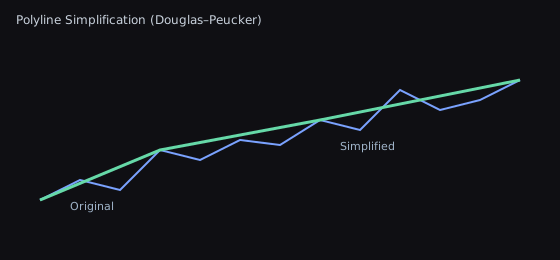
Convex hull (monotone chain / Jarvis examples used by helpers):
Visual: 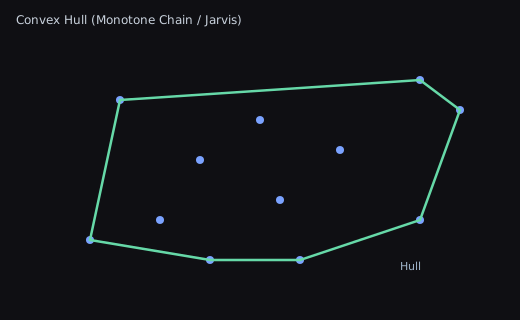
Edge Cases Gallery
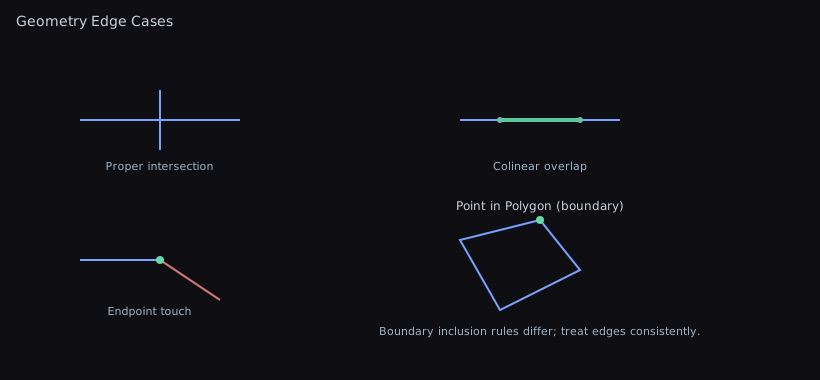
Unity Extensions
- Rect/Bounds conversions, RectTransform world bounds
- Camera
OrthographicBounds - Bounds aggregation from collections
- Pointer coordinates across overlay, camera, and world-space canvases
- RectTransform-to-collider synchronization and density-aware drag thresholds
- Sprites referenced by an
AnimationClip, with or without their curve bindings (editor-only)
Example:
Pointer Coordinates
TryGetWorldPoint and TryGetLocalPoint resolve a PointerEventData position for a RectTransform. A valid current raycast on that exact rectangle wins, followed by its press raycast; hits on other objects are ignored. The world helper returns the hit and the local helper transforms it into the target rectangle's coordinates. Otherwise, the screen position is clamped to the visible display and projected onto the rectangle. A target canvas uses its own world camera ahead of any camera from a different pointer hit. Screen Space - Overlay canvases ignore raycast world positions and use Unity's camera-free conversion.
| C# | |
|---|---|
Both methods return false for a missing event or rectangle, a non-finite raycast hit, or a screen conversion that cannot reach the rectangle's plane. Their output is the default vector on failure.
UI Bounds and Drag Thresholds
RectTransform.TrySyncBoxCollider2D copies the rectangle's local size and pivot-derived center to a BoxCollider2D on the same GameObject. It changes only the collider's size and offset, and returns false when either Unity object is missing or destroyed or belongs to a different object.
UnityExtensions.CalculatePixelDragThreshold scales a baseline threshold above the reference DPI without reducing it on low-density or unreported displays. Use the wrapper to apply the current display's value:
| C# | |
|---|---|
Fractional results round to the nearest integer using midpoint-to-even. Invalid DPI and reference values preserve the non-negative baseline, and an overflowing result is clamped to int.MaxValue.
Sprites from an AnimationClip
Editor-only. GetSpritesFromClip() yields every sprite a clip references, in binding then keyframe order. That is the right answer when a clip drives one renderer, and the wrong one when it drives several: a clip animating a child's SpriteRenderer is indistinguishable from one animating the root's, so measuring the returned sprites in the root's local space produces a plausible, wrong result rather than an empty one.
GetSpriteFramesFromClip() keeps the binding, so the caller can tell them apart:
| C# | |
|---|---|
When you only want one object's frames, filter at the call instead:
A null filter matches anything, so GetSpritesFromClip(null, null, null) is the unfiltered walk. type is matched exactly: a subclass of the type you name does not match.
Diagrams:
- RectTransform world rect (axis-aligned bounds of rotated UI):
| Text Only | |
|---|---|
- Orthographic camera bounds (centered on camera):
| Text Only | |
|---|---|
UI Toolkit Extensions
VisualElementExtensions answers two questions UI Toolkit leaves to the caller.
Is this element actually drawn?
IsShown() walks to the root, because display: None removes a whole subtree: an element with its own DisplayStyle.Flex under a hidden ancestor is not drawn, and asking only the element answers true. It walks element.hierarchy.parent rather than element.parent, because the second one is the logical tree. Measured on Unity 6000.4.6f1, a child added to a ScrollView is three links from it in the hierarchy and one link from it logically, and display applies down the hierarchy, so the logical walk skips containers that can hide the child.
IsShown() reads the inline style the caller assigned, which is immediate. IsShownResolved() reads resolvedStyle, which takes USS into account but is produced by the panel's style pass. Both walk to the root: resolvedStyle.display is not inherited, so hiding an ancestor leaves every descendant still reporting Flex.
Where is keyboard focus, and did my Focus() do anything?
| C# | |
|---|---|
Focus() reports nothing: called on an element with no focus controller (one detached from a panel, or one that is not focusable), it returns having done nothing. TryFocus() asks the panel afterwards and returns the answer. A descendant counts, because delegatesFocus makes a container hand focus to a child.
IsWithin() exists because Unity's own VisualElement.Contains is strict: measured, element.Contains(element) is false. The question "is the focused element one of mine" has to answer yes when the focused element is the one you own, so use IsWithin for that and Contains when you specifically want strict descent.
| Method | Answers |
|---|---|
element.IsShown() | Nothing on the hierarchy chain has an inline display: None |
element.IsShownResolved() | The same, through resolvedStyle (USS included, needs a style pass) |
element.IsWithin(scope) | element is scope or sits beneath it |
element.FocusedElement() | The panel's focused element, or null off-panel |
element.TryFocus() | Focus was requested and landed on it or inside it |
Color Utilities
- Averaging methods:
- LAB: perceptually accurate
- HSV: preserves vibrancy
- Weighted: luminance-aware
- Dominant: bucket-based mode
Example:
| C# | |
|---|---|
Dominant color example (bucket-based):
| C# | |
|---|---|
Diagram (dominant buckets):
| Text Only | |
|---|---|
8-bit Channels and Normalized Floats
ColorQuantization is the one place a Color channel becomes a Color32 channel and back. Three operations look interchangeable and are not, which is the mistake described in Should you normalize RGB values by 255 or 256?: "one should never mix the encode and decode steps of the two quantizers."
| C# | |
|---|---|
| Method | Rounding | Use it for |
|---|---|---|
ToNormalized | exact | Reading a stored Color32 channel as a float |
ToByte | nearest | Writing a float channel out as 8 bits |
ToThresholdByte | floor | Comparing stored channels against a float cutoff |
ToByte rounds rather than truncates, so Color.ToHex() returns the same string as Unity's own ColorUtility.ToHtmlStringRGBA() and the same bytes as the Color32 that color casts to. Truncating instead doubles the mean quantization error and makes FF unreachable for any channel short of exactly 1.0.
ToThresholdByte is deliberately not ToByte. It answers "which channels satisfy channel / 255f <= cutoff", and only flooring reproduces that comparison exactly. Rounding misclassifies the channel sitting on the boundary, which is how two callers of the same alpha cutoff end up disagreeing about which pixels are transparent.
All three clamp: values outside [0, 1] saturate and NaN encodes to 0.
ChannelStep is a step size, not a decode
ColorQuantization.ChannelStep is 1f / 255f, the distance between two adjacent channels. It is there to scale a tolerance expressed in channels, which is how WallMath uses it. It is not how you decode:
| C# | |
|---|---|
Those disagree by one ULP on 126 of the 256 channels, measured on 6000.4.6f1. ToNormalized divides, which is bit-for-bit what Unity's own Color32 to Color conversion gives you and what every / 255f in your own code gives you, so a pixel is classified the same way whichever decoder reaches it first. A decoder that rounds differently from its callers is precisely the mistake this type exists to prevent.
Readable Text on Any Background
ColorContrast answers "can this be read against that?" the way WCAG defines it.
ContrastRatio measures opaque colors. Use Composite first when a color is translucent. It applies the foreground alpha over an opaque background and returns the visible opaque color.
The tempting shortcut, thresholding the familiar 0.299r + 0.587g + 0.114b luma, measures perceived brightness, and brightness is not contrast. Contrast is a ratio between two colors' relative luminance, computed on linearized channels with different weights. The two disagree most on saturated greens and cyans, which is exactly where a button palette lives: on rgb(0, 0.937, 0) the luma rule picks white at 1.58:1 where black gives 13.32:1.
ReadableTextColor has no threshold to tune. It computes both candidate ratios and returns the winner. Every channel is bounded before it is linearized, so an HDR or NaN color yields a luminance in [0, 1] and a ratio in [1, 21] rather than nonsense.
Resampling a Texture
TextureResampling is the matching single rule for scaling: where a destination pixel samples the source, and how colors of different opacity are allowed to mix. TextureScale, the Image Blur tool and the sprite sheet extractor's previews all go through it.
A destination pixel covers a range of the source, and its sample belongs in the middle of that range. Mapping index straight onto index instead shifts the image half a destination texel toward the origin, so an upscale never reaches the source's last pixel and a symmetric image stops downscaling symmetrically.
| C# | |
|---|---|
Interpolating straight color gives a fully transparent texel's RGB the same weight as a visible one, which is why a red sprite beside a transparent green background acquires a yellow edge. Premultiplying weights each color by its own opacity. It is exactly the identity on an opaque image, so only images that are wrong today change. Unpremultiply takes the straight-color result as a fallback because an all-transparent neighborhood cannot have its alpha divided back out; that keeps a fully transparent image's RGB intact instead of flattening it to black.
Collections
Value Enumeration
See avoiding enumerator boxing to choose a traversal, handle null sources and understand allocation limits.
AsValueEnumerable provides a lazy value view over IEnumerable<T>, including IReadOnlyList<T> and IReadOnlyCollection<T> sources. Arrays, exact List<T> and exact HashSet<T> instances avoid boxing their enumerators. Null and default views are empty. The view does not copy the collection or read its count or indexer.
| C# | |
|---|---|
If a consumer also imports ZLinq, both libraries expose AsValueEnumerable for IEnumerable<T>. C# reports CS0121 for an ambiguous extension call. Select the intended implementation explicitly: ZLinq.ValueEnumerable.AsValueEnumerable(source) for an existing ZLinq query, or WallstopStudios.UnityHelpers.Core.Extension.IEnumerableExtensions.AsValueEnumerable(source) for the unity-helpers view. Retain that choice when migrating consumer code so later query operators keep their intended library and behavior.
AsValueDictionaryEnumerable provides the same lazy behavior for IEnumerable<KeyValuePair<TKey, TValue>>, including dictionary interfaces. Exact Dictionary<TKey, TValue> instances use their concrete value enumerator. Derived dictionaries keep their interface protocol. Other sources, including sorted dictionaries, keep their original enumerator and its allocations. Use AsValueEnumerable for pair arrays, lists and hash sets.
Use ValueEnumerable<T>.RequireSource or ValueDictionaryEnumerable<TKey, TValue>.RequireSource when a null sequence must retain its enumeration failure. Creating the view stays lazy; acquiring its enumerator raises the original null-source failure. Generated protobuf formatters use these factories for interface-declared collections, keeping custom protocols and concrete struct receivers.
Custom sequences, derived collections and other collection types retain their original GetEnumerator, MoveNext, Current and Dispose behavior, including exceptions and allocations. Lists, hash sets and exact dictionaries retain their mutation checks. Array enumeration observes changes to array elements. Early exit still disposes the enumerator. Copies of a fallback enumerator share the source's lifetime; use each enumerator within one foreach or using scope. Read Current only after a successful MoveNext.
Keep direct enumeration of concrete collections and strings when it already uses a value enumerator or indexed traversal. This view removes boxing for the supported collection shapes; it does not remove allocations performed by custom enumerators or loop bodies.
IEnumerable Helpers
Infinite cycling:
| C# | |
|---|---|
Partition into chunks:
PartitionPooled reuses lists; its enumerator still allocates. Dispose each batch before advancing unless you need to retain it. Disposing the enumerator returns all outstanding lists, even when the source throws during cleanup. Source cleanup exceptions are suppressed so they cannot replace an exception from your batch processing.
Shuffled (non-destructive):
| C# | |
|---|---|
OrderBy, Ordered, and Shuffled build their returned List<T> directly when the source exposes an ICollection<T> count. Other sources use a pooled staging list so the returned list has capacity for its actual element count instead of retaining growth headroom. Each source is enumerated once, and Shuffled keeps the same random draw order.
IList Operations
Remove O(1) by swapping with last element:
| C# | |
|---|---|
The operation requires a resizable list. On a fixed-size IList<T> such as an array or ArraySegment<T>, it throws NotSupportedException without changing the backing storage.
Append a range
IListExtensions.AddRange appends in source order. Passing the destination itself duplicates its original elements once, including when it is a Collection<T> or a SerializableList<T> held as IList<T>:
| C# | |
|---|---|
For exact List<T> and SerializableList<T> sources, SerializableList<T> uses its bulk append operation, which also supports another wrapper sharing the same backing list. Other sources retain their enumeration and disposal behavior, including derived lists with custom enumerators. The destination can still grow its capacity. Fixed-size or read-only lists reject nonempty appends, and a null source throws ArgumentNullException. If an iterator throws, items yielded before the failure can remain in the destination. Materialize a deferred query over the destination before appending it; arbitrary aliased iterators are not snapshots.
Rotate by any signed position
Positive RotateLeft positions move elements left; negative positions move them right. Both list and span overloads normalize the position before changing direction, including int.MinValue:
| C# | |
|---|---|
Empty and single-element inputs remain unchanged. A null IList<T> remains a no-op. Span and array rotation work in place; other list shapes use the existing pooled scratch path in Shift.
Partition (split by predicate):
| C# | |
|---|---|
Custom sorting:
| C# | |
|---|---|
Span Operations
Span<T> is not an IList<T>, so a caller holding a stackalloc buffer or a slice could reach none of the above. SpanExtensions covers it.
They consume the random source draw for draw exactly as their IList siblings do, because they are the same body: IList<T>.Shuffle reaches Span<T>.Shuffle for its array fast path and for its pooled write-back path alike, and IList<T>.Shift reaches Span<T>.Shift the same way. So a project with seeded, reproducible generation can move a shuffle onto a stack buffer and get byte-identical output -- which is the property that decides whether the move is possible at all.
| Method | Notes |
|---|---|
Shuffle(random) | Fisher-Yates in place, same draws as the IList sibling |
TryCopyShuffled(destination, random) | Shuffles a copy; false for a short destination, writing and drawing nothing |
TryGetRandomElement(out element, random) | False for an empty span |
TrySwap(indexA, indexB) | False for an index outside the span, writing nothing |
Fill(factory) | Index-driven fill; a null factory writes nothing |
Shift(amount), RotateLeft(n), RotateRight(n) | Three reversals; the amount is normalized, so any integer is well-defined |
IndexOf(predicate), LastIndexOf(predicate) | Predicate search, -1 for no match or a null predicate |
TryFindAll(destination, state, predicate, out written) | The non-allocating FindAll |
TryPartition(matching, notMatching, state, predicate, ...) | The non-allocating Partition |
Nothing here throws. An index, a bound or a destination that cannot work is reported, which is why there is no throwing span counterpart to IList<T>.GetRandomElement or IList<T>.Swap.
TryFindAll refuses differently from TryCopyShuffled on purpose: it keeps whatever already fit and reports the count, so a caller can grow the buffer and retry. Counting first to leave the destination pristine would run the predicate twice per element. TryPartition instead requires both destinations to be at least as long as the source -- either side can take every element -- so its refusal writes nothing.
A Span<T> cannot be captured by a lambda or held across an await or a yield. A predicate passed as an argument is fine, but one that closes over caller state allocates, so every predicate-taking method has a TState overload that keeps the lambda static:
| C# | |
|---|---|
Span<T> already carries Fill(T), Reverse(), Clear() and MemoryExtensions.IndexOf(T), so this type deliberately does not shadow them. A ReadOnlySpan<T> receiver needs an explicit cast at this language version, because an extension receiver takes no user-defined conversion.
Sorting a Span
All 18 list sorting algorithms also accept Span<T>, including stack buffers and array slices. Pass an explicit SortAlgorithm to Sort, or use the named methods such as GrailSort, InsertionSort, PatternDefeatingQuickSort, and YamSort.
| C# | |
|---|---|
These overloads use the same algorithm kernels and comparer as the list methods, preserving ordering and stability guarantees. They copy through one pooled buffer of the span's length; the selected algorithm may also rent its usual scratch buffers. Cold pools can allocate. Only the supplied slice is written back, so elements outside it remain untouched. Empty and single-element spans do not rent a buffer or call the comparer.
An invalid algorithm throws InvalidEnumArgumentException, including for an empty span. Comparer exceptions propagate; the caller's span stays unchanged, and pooled buffers are returned and cleared when they contain managed references. The explicit algorithm argument keeps Sort(comparer) available to the framework without an ambiguous extension call.
Dictionary Helpers
Thread-safe get-or-create:
| C# | |
|---|---|
Merge dictionaries:
| C# | |
|---|---|
Deep equality:
| C# | |
|---|---|
Bounds from Collections
Bounds from points example:
| C# | |
|---|---|
Bounds aggregation example:
| C# | |
|---|---|
NaN containment behavior
The containment guard audit for #716 distinguishes a skipped early rejection from a successful final acceptance. For explicit NaN coordinates and extents, these predicates already returned false through their final comparisons:
| Predicate family | Why NaN is harmless here |
|---|---|
FastContains2D for points and bounds | The final upper-bound comparisons return false. Z is deliberately ignored. |
FastIntersects2D, Overlaps2D, FastIntersects | A NaN center or extent propagates to both limits; final overlap comparisons return false. |
FastContains3D, FastContainsHalfOpen3D, FastIntersects3D | Final comparisons return false for NaN points, bounds or tolerance. |
BoundingBox3D.Contains and Intersects | Acceptance requires ordered comparisons on every axis. The constructor also rejects NaN endpoints; infinite limits remain supported. |
| Spatial hash distance rejection | Inserted points and query centers are validated before distance comparisons; infinite query radii remain supported. |
BoundsInt and integer cell coordinates | Integer values cannot represent NaN. |
Bounds whose infinite center and extent produce just one NaN limit previously bypassed some early rejections. The bounds predicates now require ordered comparisons at both ends, rejecting those malformed limits as well. Spatial tree range and nearest queries also exclude elements with NaN distances, including whole-node range shortcuts. RTree3D excludes authored bounds with NaN edges or inverted limits from its index while retaining its original elements snapshot.
A 2D predicate intentionally ignores a NaN Z coordinate. These are predicate contracts, not a promise that arbitrary geometry arithmetic repairs invalid inputs.
Strings
Case Conversions
Why it exists: Automatically convert between common programming case styles without writing regex or manual parsing.
| C# | |
|---|---|
Smart tokenization handles mixed cases intelligently.
Slugs
Why it exists: a case conversion is not a slug. ToKebabCase keeps punctuation and accents, so "Café Menu -- 50% Off!" becomes "café-menu-50%-off!", not something you can put in a URL, a filename, or an addressable key.
| C# | |
|---|---|
The result is only lowercase ASCII letters, digits and single hyphens, with no hyphen at either end.
Accents fold to their ASCII base rather than being dropped, so "Café" keeps all four of its letters and slugs to "cafe". Characters with no ASCII form (emoji, and ideographic scripts such as CJK) are removed, so a string written entirely in such a script slugs to empty. Check for that rather than assuming a non-empty input yields a non-empty slug.
String Utilities
Levenshtein Distance (edit distance):
| C# | |
|---|---|
Base64 encoding:
| C# | |
|---|---|
FromBase64 returns empty text for malformed Base64 or invalid UTF-8. Its temporary byte array stays inside the call and returns to the pool in finally, without disposal-lease bookkeeping.
String analysis:
| C# | |
|---|---|
Truncate with ellipsis:
| C# | |
|---|---|
Encoding Helpers
Directions
- Conversions between enum and vectors; splitting flag sets; combining
Example:
| C# | |
|---|---|
Enum Helpers
Why it exists: Standard C# enum operations cause boxing allocations and are slow in hot paths. These helpers solve performance problems.
Enum numeric conversion uses a checked span containing exactly one local enum value. It preserves signed extension for all eight underlying integer types, including undefined values, aliases, and flag combinations. Cached names and HasFlagNoAlloc use the same conversion. The implementation does not use unchecked memory-access helpers.
Zero-Allocation Flag Checking
The problem: Standard HasFlag() boxes both enums, causing GC pressure.
Use HasFlagNoAlloc in:
- Per-frame checks
- Hot loops
- Frequently-called methods
- Performance-critical code paths
Cached Enum Values and Name Ordering
EnumValues<T>.Values in WallstopStudios.UnityHelpers.Core.Helper exposes a ReadOnlySpan<T> cached once per enum type. Reading and iterating the view allocates nothing after initialization. Values use the unsigned numeric ordering of Enum.GetValues, including repeated values for aliases; an empty enum returns an empty span. Call ToArray() when you need your own mutable copy.
EnumNameComparer<T>.Instance orders values by ToCachedName() using ordinal, case-sensitive comparison, independent of the current culture. Aliases compare equal because they share the same numeric value and cached name. Undefined values and flags combinations follow ToCachedName() formatting. Name-cache initialization may allocate; warmed comparisons of declared values do not. Undefined values and flags combinations outside the bounded name cache may allocate on every comparison.
| C# | |
|---|---|
EnumValues<T> supports generic callers constrained to struct, Enum; EnumNameComparer<T> requires an unmanaged enum for cached name lookup. A span cannot be stored in a class field or kept across an await or coroutine yield; retrieve the view where you use it.
Fast Enum-to-String Conversion
The problem: enum.ToString() is slow (reflection) and allocates every call.
Performance: ToCachedName uses cached lookups to avoid repeated allocations and string conversions after the first call.
The cache picks its strategy from how far apart the enum's members are, not how many there are: members within 256 of each other get a direct array index, anything wider gets a dictionary. Negative members count normally toward that span, so enum Direction { Left = -1, None = 0, Right = 1 } is three slots wide, not billions.
Display Names for UI
The problem: Enum values often need different names in UI than in code.
Use for:
- Dropdown labels in UI
- Localization keys
- User-facing text that doesn't match code names
Random Generators
Why it exists: Unity's Random class is limited and not suitable for all scenarios. These extensions provide additional random generation capabilities.
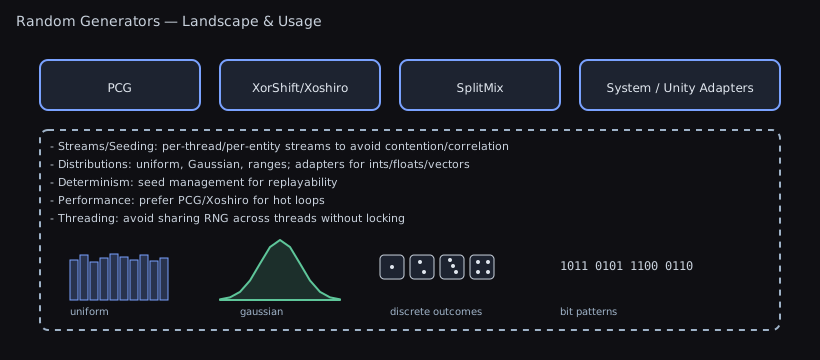
Weighted Random Selection
The problem: Selecting items based on probability weights (loot tables, spawn chances).
Weights must be finite. Array and tuple selection reject negatives and nonfinite float totals; list selection retains its finite-negative-as-zero behavior and sums in double. All forms reject NaN and infinity before consuming a random draw. NextBool(probability) accepts only [0, 1].
For overflow-safe double spans, seeded exponential-race selection, unique weighted subsets, allocation-free caller scratch, validation rules, and cross-runtime near-tie behavior, see the weighted span APIs.
Vector and Quaternion Generation
Uniform random vectors:
Color Generation
| C# | |
|---|---|
NextColorInRange varies hue, saturation and value around baseColor and returns the result with baseColor's alpha. Hue is an angle, so it wraps: a base hue of 0 varies onto both sides of the 0/1 seam. Saturation and value are clamped to [0, 1], so an HDR base color comes back with its intensity clamped. A variance of zero pins that channel to the base color, a negative variance is read as its magnitude, and a variance that is not a finite number is read as zero.
Subset Sampling
Reservoir sampling: Pick k random items from a large collection without loading it all into memory:
| C# | |
|---|---|
Random Utilities
| C# | |
|---|---|
Async/Coroutine Interop
Why it exists: Unity's AsyncOperation and coroutines don't natively support modern async/await patterns. This bridges the gap.
Await AsyncOperation (Unity < 2023.1)
The problem: Unity's AsyncOperations (scene loading, asset loading) don't support await.
| C# | |
|---|---|
Note: Unity 2023.1+ has built-in await support, but this works in older versions.
Convert AsyncOperation to Task
| C# | |
|---|---|
Run Task as Coroutine
The problem: You have async/await code (from a library, or your own), but need to run it in a Unity coroutine context.
Tuple overloads accept callbacks with two or three arguments. They allocate an iterator without an extra callback wrapper. Callbacks run when the coroutine observes completion, not when you create it. Every completed ValueTask source is consumed once, including scalar results when no callback is supplied, so pooled sources can release their operation slots or buffers. Pending ValueTask operations may also allocate a backing task.
Already-completed cancellation is propagated by the ValueTask adapters, including the nongeneric and scalar overloads without callbacks. Pending cancellation in those two paths retains the existing behavior: the source is consumed, but the coroutine finishes without throwing. Faulted tasks continue to propagate their existing aggregate exceptions, and a throwing result callback runs after its source has been consumed.
Chain Continuations
When to use:
- Integrating third-party async libraries with Unity
- Mixing async/await code with existing coroutine systems
- Background operations that need to update Unity objects on completion
- Modernizing legacy coroutine code
When NOT to use:
- Unity 2023.1+ (use built-in await support)
- Simple fire-and-forget operations (just use coroutines)
- When you have control over both ends (just use all-async or all-coroutines)
Best Practices
- Use
PositiveModinstead of%for indices and angles when negatives are possible. - Prefer
SimplifyPrecisefor offline tooling; useSimplifyduring gameplay for speed. - Choose color averaging method per goal: LAB for perceptual palette, Weighted for speed, Dominant for swatches.
- Favor IReadOnlyList/HashSet specializations to minimize allocations; pooled buffers are used where applicable.
- Run Unity-dependent extensions (e.g.,
RectTransform,Camera,Grid) on the main thread.
Related Docs
- Random performance details: Random Performance
- Serialization formats: Serialization Guide
- Effects system: Effects System
- Relational Components: Relational Components