Singleton Utilities (Runtime + ScriptableObject)
Visual
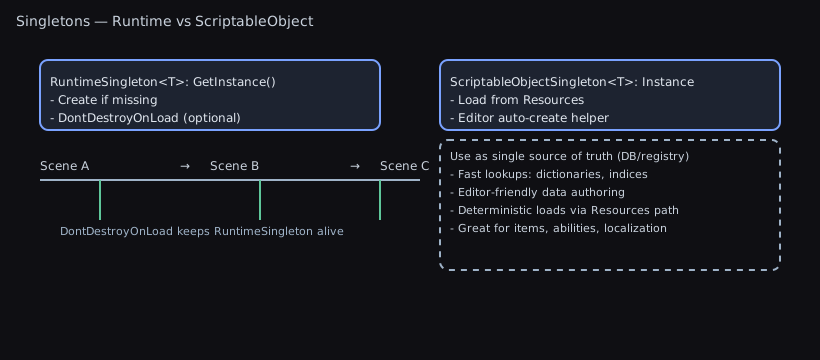
This package includes two lightweight, production‑ready singleton helpers that make global access patterns safe, consistent, and testable:
RuntimeSingleton<T>: a component singleton that ensures one instance exists in play mode, optionally persists across scenes, and self‑initializes when first accessed.ScriptableObjectSingleton<T>: a configuration/data singleton backed by a single asset underResources/, with an editor auto‑creator to keep assets present and correctly placed.
Odin compatibility: when Odin Inspector is installed as the
odininspectorpackage, the singleton bases inherit from Odin's serialized base types. WithWALLSTOP_UNITY_HELPERS_DISABLE_ODIN_BASESdefined, or without Odin, they compile against Unity'sMonoBehaviour/ScriptableObjectbase types. Consumer assemblies do not inherit this package'sWALLSTOP_UNITY_HELPERS_ODIN_INSPECTORsymbol; use a project-local asmdef version define for your own conditional Odin code.
TL;DR: What Problem This Solves
- Stop hand‑rolling global access. Get a single, safe instance you can call from anywhere.
- Choose between a scene‑resident component or a project asset for settings/data.
- No manual setup: instances auto‑create on first use; ScriptableObject assets auto‑create/move under
Resources/in the Editor.
Auto-loading singletons
- Add
[AutoLoadSingleton]to anyRuntimeSingleton<T>orScriptableObjectSingleton<T>to have it instantiated automatically. - The editor’s Attribute Metadata generator discovers those attributes (via
TypeCache) and serializes the type name + load phase intoAttributeMetadataCache. No manual registration or code-generation is required. - At runtime (play mode only),
SingletonAutoLoaderreads the serialized entries and uses reflection to touch each singleton’sInstanceduring the configuredRuntimeInitializeLoadType(defaultBeforeSplashScreen). - Prefer auto-loading only for global services/data that every scene requires; optional or level-specific systems should still call
Instancemanually. - Example:
| C# | |
|---|---|
Quick decision guide
- Need a behaviour that runs (Update, events, coroutines) and may persist across scenes? Use
RuntimeSingleton<T>. - Need global config/data you edit in the Inspector and load from any scene? Use
ScriptableObjectSingleton<T>.
Quick Start (1 minute)
RuntimeSingleton
| C# | |
|---|---|
ScriptableObjectSingleton
Contents
- Odin Compatibility
- When To Use / Not To Use
- RuntimeSingleton
- Lifecycle diagram, examples, pitfalls
- ScriptableObjectSingleton
- Lookup + auto‑creator diagrams, examples, tips
- Scenarios & Guidance
- Troubleshooting
Odin Compatibility
- With Odin installed as the
odininspectorpackage,RuntimeSingleton<T>inherits from Odin'sSerializedMonoBehaviour, andScriptableObjectSingleton<T>inherits from Odin'sSerializedScriptableObject. - Without Odin, those same public types compile through Unity's
MonoBehaviourandScriptableObjectbase classes, so registry installs do not need Sirenix assemblies. - Add
WALLSTOP_UNITY_HELPERS_DISABLE_ODIN_BASESto Player Settings > Other Settings > Scripting Define Symbols for each target to use Unity bases for both singleton families andAttributeEffectwhile Odin is installed. This project-wide setting keeps Odin drawers and other integrations enabled and works in Odin compatibility builds. It is a compile-time choice; an attribute or runtime setting cannot change a C# base class. - Changing the base removes Odin serialization from singleton fields. Migrate any Odin-only saved fields before switching; the symbol does not convert saved data.
- Odin editor integrations for Odin serialized targets are enabled by the same package-owned define.
- Consumer assemblies do not inherit this package's
WALLSTOP_UNITY_HELPERS_ODIN_INSPECTORsymbol. If your own code conditionally references Odin types, define a project-local asmdef version define forodininspector.
When To Use
RuntimeSingleton<T>- Cross‑scene services (thread dispatcher, audio router, global managers).
- Utility components that should always be available via
T.Instance. -
Creating the instance on demand when not found in the scene.
-
ScriptableObjectSingleton<T> - Global settings/configuration (graphics, audio, feature flags).
- Data that should be edited as an asset and loaded via
Resources. - Consistent project setup for teams (auto‑created asset on editor load).
When Not To Use
- Prefer DI/service locators for heavily decoupled architectures requiring multiple implementations per environment, or for test seams where global state is undesirable.
- Avoid
RuntimeSingleton<T>for ephemeral, per‑scene logic or objects that should be duplicated in additive scenes. - Avoid
ScriptableObjectSingleton<T>for save data or level‑specific data that should not live in Resources or should have multiple instances.
RuntimeSingleton<T> Overview
- Access via
T.Instance(creates a newGameObjectnamed"<Type>-Singleton"and addsTif none exists; otherwise finds an existing active instance). HasInstancelets you check for an existing instance without creating one.TryGetInstance(out T instance)returns the assigned live instance in one call. It returnsfalseand a managednullwhen the cache is empty, destroyed, or pending destruction. It never searches the scene, creates a GameObject, or enters the main-thread creation guard.Preserve(virtual, defaulttrue) controlsDontDestroyOnLoad.CreationPolicyreports whether on-demand creation is allowed; see Controlling on-demand creation.- Handles duplicate detection and cleans up the instance reference on destroy. Before scene load, the static cache resets without destroying live components, so scene-authored values remain available.
ClearInstance() runs on the main thread and destroys the current snapshot of active and inactive instances. It stops their coroutines before requesting destruction and resets the cache even when cleanup fails. Unity dispatches and logs exceptions from OnDisable and OnDestroy.
In EditMode, destruction invokes those callbacks immediately. A callback's clear request for another singleton type waits until the current type finishes, including when the objects share a GameObject or have a parent/child relationship. Repeated requests for a pending or clearing type are ignored. The outermost clear finishes all queued requests before returning. In PlayMode, Unity still defers object destruction normally; startup cache-only resets preserve authored objects.
Singleton components on a GameObject pending destruction, including inactive children and other singleton types, immediately stop reporting HasInstance and are excluded from discovery. Once ClearInstance() returns, a same-frame Instance access can therefore create a fresh instance without reviving the one Unity is about to destroy. NeverCreate returns null until a new authored instance appears. The same exclusion applies when Start() destroys a duplicate singleton's GameObject, and survives cache-only resets before the frame ends. Pending state belongs to the component, so there is no static collection retaining destroyed GameObjects. If a creation callback calls ClearInstance() or immediately destroys its own singleton, that Instance access returns null without retrying creation; a later access can try again. Registering an authored instance also invalidates an earlier same-frame NeverCreate miss, so a surviving duplicate remains discoverable after the primary is cleared.
While an explicit clear is running synchronously, callbacks can still resolve unaffected live instances but cannot create missing ones. Deferred PlayMode callbacks run after the clear returns and follow the normal lookup policy; the application-shutdown guard still prevents creation while Unity is quitting. See the deferred cleanup regression.
Example: Simple service
Odin note: RuntimeSingleton<T> uses Odin's SerializedMonoBehaviour when Odin is installed and both base opt-outs are absent, and Unity's MonoBehaviour otherwise. Consumer assemblies that reference Odin types directly still need their own asmdef version define.
Common pitfalls:
- If an inactive instance exists in the scene,
Instancewon’t find it (search excludes inactive objects) and will create a new one. - If two active instances exist, the newer one logs an error and destroys itself.
- If
Preserveistrue, the instance is detached with Unity’sworldPositionStaysbehavior and markedDontDestroyOnLoad, retaining its world position and rotation. Unity cannot preserve shear from a rotated child under a nonuniformly scaled parent when detaching.
Lifecycle diagram:
| Text Only | |
|---|---|
Notes:
- To avoid creation during a sensitive frame, place a pre‑made instance in your bootstrap scene.
- For scene‑local managers, override
Preserve => false.
Controlling on-demand creation
On-demand creation is what makes T.Instance work from anywhere, and it is right for a singleton that holds no authored state (a coroutine host, a dispatcher). It is wrong for one that does.
A created instance is a bare component: every [SerializeField] is left at its default. So a manager you authored in a boot scene, loaded from the wrong scene, hands back a stand-in with no settings that behaves like the real thing right up until it writes something. Annotate those:
SaveManager.Instance now returns the instance in the scene when there is one and null when there is not, logging one warning naming the type instead of substituting an empty stand-in. The policy governs creation only; an instance you authored is still found and still served.
| Policy | Instance with no instance in any loaded scene |
|---|---|
CreateOnDemand (default, no attribute) | Creates "<Type>-Singleton" and returns the new component |
NeverCreate | Returns null and logs one warning per type |
Notes:
- The decision is read from the type rather than from a virtual property, because there is no instance to ask when the question is whether to make one.
- The warning is logged once per type and re-armed by
ClearInstance(), so a per-frame access cannot flood the console. In play mode the refused lookup is remembered too, soif (X.Instance != null)inUpdate()costs nothing after the first miss. ClearInstance()is not a reset for these. It destroys every live instance, and aNeverCreatetype will not build a replacement;Instancestaysnulluntil something else creates one. Use it in tests and in editor tooling that is about to reload the scene, not as a runtime reset.- It is a development diagnostic: release players skip it entirely.
- Once Unity begins application shutdown, neither singleton family creates or loads a missing instance. A live instance already found remains available so teardown code can finish against it.
- Write every runtime singleton as
sealed class X : RuntimeSingleton<X>. If a sibling inheritsRuntimeSingleton<X>with a different runtime type, itsAwakeis rejected and logged rather than enteringX's cache. ScriptableObjectSingleton<T>needs no policy. It never creates an asset at runtime: a missing one already returnsnullwith a warning. The editor's opt-out for asset creation is[ExcludeFromSingletonCreation].- Pairing
NeverCreatewith[AutoLoadSingleton]at any phase beforeAfterSceneLoadis reported in the editor: the auto-load runs before any scene exists, so it can only ever find nothing.
ScriptableObjectSingleton<T> Overview
- Access via
T.Instance(lazy‑loads fromResources/using either a custom path or the type name; warns if multiple assets found and chooses the first by name). HasInstanceindicates whether the lazy value exists and is not null.TryGetInstance(out T instance)returns an already loaded live asset, orfalseand a managednull. It never evaluates an unloaded or faulted lazy loader, searches Resources, repairs a destroyed cache, or creates an asset. Both singleton families allow this cache lookup from a worker thread; use the returned object only with Unity's usual thread rules.- Optional
[ScriptableSingletonPath("Sub/Folder")]to control theResourcessubfolder. Blank subfolders, including whitespace wrapped in slashes, fall back to the type name in the Resources root. Spaces inside a nonblank folder name are preserved. - Editor utility auto‑creates and relocates assets: see the “ScriptableObject Singleton Creator” in the Editor Tools Guide.
Example: Settings asset
Odin note: ScriptableObjectSingleton<T> uses Odin's SerializedScriptableObject when Odin is installed and both base opt-outs are absent, and Unity's ScriptableObject otherwise. Keep any additional Odin-only consumer code behind a consumer-owned define.
Cache reset callbacks run on the main thread before the old asset reference is released. Override OnInstanceCleared() to release derived caches. Reading Instance inside that callback still returns the live asset being cleared. If cleanup destroys that asset, Instance returns null until the reset finishes. A nested reset of the same singleton is ignored, including a reset reached through another singleton's callback. During the global scene-load reset, live cached assets remain available, but uncached or destroyed assets cannot load until all callbacks finish. Recursive global resets are ignored, so each callback runs at most once per pass. A load invalidated by a synchronous reset returns null; a later lookup can load again. A value destroyed during loading also returns null. Callback exceptions are logged once; the reset still replaces the lazy loader and rearms metadata lookup. The reset itself does not destroy the asset or schedule destruction as RuntimeSingleton<T>.ClearInstance() does. HasInstance becomes false until the next lookup, which can return the same live asset even in the same frame. Once Unity has actually destroyed an asset, HasInstance excludes it through Unity's native null check, and the next main-thread lookup repairs that stale cache. During shutdown, that lookup drops the destroyed cached reference and leaves the replacement loader unevaluated. Pending-destruction tracking for runtime GameObjects therefore does not apply to this cache-only reset.
| State when reset starts | Callback behavior | Result after reset |
|---|---|---|
| Never loaded, missing, or failed load | No callback | Fresh lazy loader and metadata lookup |
| Live cached asset | Invoke once with the old instance still available | Cache empty; asset remains alive |
| Destroyed cached asset | No callback | Fresh lazy loader and metadata lookup |
| Callback resets the same type | Ignore nested reset | Outer reset completes once |
| Callback destroys its asset | Refuse reload until reset finishes | Next access can load a surviving asset |
| Global callback requests another reset | Ignore recursive global reset | Each callback runs once per pass |
| Callback throws | Log the exception | Cache empty; next access may load again |
Asset management tips:
- Place the asset under
Assets/Resources/(or under the path from[ScriptableSingletonPath]). - The Editor’s “ScriptableObject Singleton Creator” runs on load to create missing assets and move misplaced ones. Automatic creation respects editor suppression, asset-import workers, and compilation or import activity.
An unexpected error releases the creation guard so a later attempt can run. The active asset batch still disposes before the guard releases. Created or moved assets remain in place after a failure. When an asset body is missing but its GUID remains, stale-artifact cleanup requests a synchronous import before replacement creation. Creation and synchronous import run with batching temporarily paused before the created asset is checked; the surrounding batch resumes afterward.
Lookup order diagram:
| Text Only | |
|---|---|
Auto‑creator flow (Editor):
| Text Only | |
|---|---|
Asset structure diagram:
| Text Only | |
|---|---|
Scenarios & Guidance
- Global dispatcher: See
UnityMainThreadDispatcherwhich derives fromRuntimeSingleton<UnityMainThreadDispatcher>. - Global data caches or registries: Use
ScriptableObjectSingleton<T>so data lives in a single editable asset and loads fast. - Cross‑scene managers: Keep
Preserve = trueto avoid duplicates across scene loads.
Data Registries & Lookups (Single Source of Truth)
ScriptableObject singletons excel as in‑project “databases” for content/config:
- Centralize definitions (items, abilities, buffs, NPCs, localization) in one asset.
- Build fast lookup indices (by ID/tag/category) at load or validation time.
- Keep workflows simple: edit in Inspector, no runtime bootstrapping needed.
Example: Items DB with indices
Tips
- The auto-creator now maintains
Assets/Resources/Wallstop Studios/Unity Helpers/ScriptableObjectSingletonMetadata.asset, which records the exactResourcesload path + GUID for every singleton asset. At runtime,ScriptableObjectSingleton<T>consults this metadata so it can callResources.Load("Folder/MySingleton")directly (orResources.LoadAllscoped toFolder/when it needs to detect duplicates) and never falls back toResources.LoadAll(string.Empty). - When metadata is missing or stale (e.g., if you deleted the metadata asset in a test project), the runtime logs a warning once per type and falls back to a bounded search (
Resources.Load<T>(typeName)+ editor-onlyAssetDatabaselookups) instead of scanning the entireResourcestree. - Keep serialized lists as your source of truth; build dictionaries at load/validate.
- Use
[ScriptableSingletonPath]to place the asset predictably underResources/. - Split huge DBs into themed sub‑assets and cross‑reference via indices.
- Consider GUIDs or string IDs for modding; validate uniqueness in
OnValidate.
Example: Content DB with tags, categories, GUIDs (Addressables)
Why this works well
- One authoritative asset; code reads through stable APIs.
- Deterministic load path via Resources; Addressables used only for content references.
- Indices rebuilt automatically to keep lookups fast and in sync while editing.
When Not To Use ScriptableObject Singletons as DBs
Use alternatives when one or more of these apply:
- Very large datasets (tens of thousands of records or >10–20 MB serialized)
- Prefer Addressables catalogs, binary blobs, streaming assets, or an external store; load by page or on demand.
- Frequent live updates/patches without app updates
- External data sources (remote JSON/Protobuf), Addressables content updates, or platform DBs are better suited.
- Strong need for async/background loading or partial paging
- Addressables + async APIs give finer loading control versus a monolithic Resources asset.
- Cross‑team/content pipelines that generate data at build time
- Import raw data into Addressables or assets at build; consider codegen for IDs and indices.
- Complex versioning/migrations of data formats
- Store version tags and migrate on load, or keep data outside Resources where migrations are simpler to stage.
- Sensitive/untrusted inputs
- Don’t deserialize untrusted data into SOs; use validated formats and sandboxed loaders.
- Save data
- Keep save/progression separate from the content DB; reference content by GUID/ID in saves.
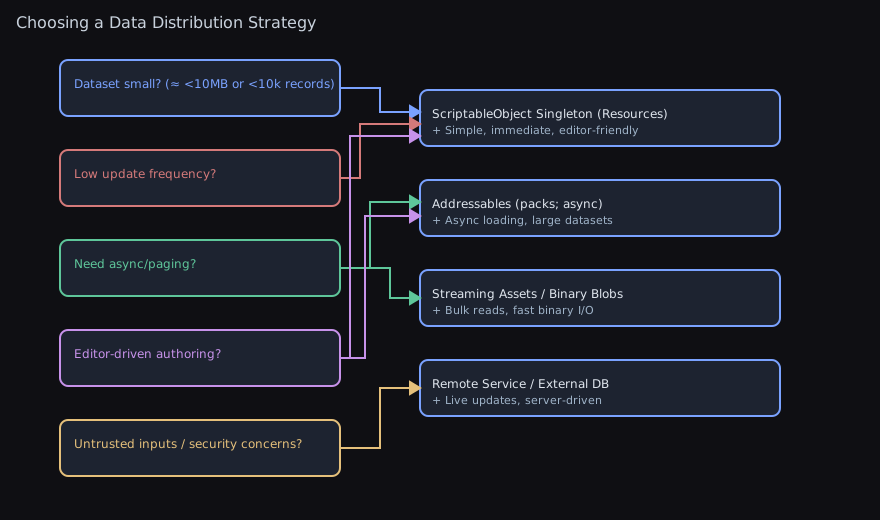
Choosing a Data Distribution Strategy
Use this chart to pick an approach based on constraints:
Testing Patterns
Testing with RuntimeSingleton<T>
Runtime singletons require special handling in tests to avoid leaked GameObjects and unpredictable state across test runs. The recommended pattern uses CommonTestBase which handles cleanup automatically.
Pattern 1: Extend CommonTestBase
Pattern 2: Manual Scope Management
For tests that need finer control over singleton lifecycle:
Pattern 3: Temporarily Disable Auto-Creation
For specific tests that need to verify behavior when the singleton doesn't exist:
Testing with ScriptableObjectSingleton<T>
ScriptableObject singletons load from Resources/ and are typically tested in Editor tests where asset manipulation is possible.
Pattern 1: Use Editor Test Fixtures
Pattern 2: Create Test-Specific Assets
For tests that need controlled data:
Key Testing Guidelines
-
Inherit from
CommonTestBase: This handles most singleton cleanup automatically, including dispatcher scope management. -
Use
AutoCreationScopefor dispatcher: Configure real scoped auto-creation and instance cleanup withEnabledorDisabled; keep fixture helpers in the test assembly. -
Prefer
destroyImmediate: truein EditMode: EditMode tests should useDestroyImmediateto ensure synchronous cleanup without Unity's delayed destruction. -
Track created objects: Use
Track<T>()orTrackDisposable<T>()to ensure objects are cleaned up after tests. -
Clear singleton state between tests: Domain reloads clear singleton instances, but within a test run you may need explicit cleanup.
Troubleshooting
Best Practices
- Prefer placing a pre-made runtime singleton in a bootstrap scene when construction order matters; avoid first-access implicit creation during critical frames.
- For scene-local managers, override
Preserve => falseto prevent cross-scene persistence. - Keep exactly one singleton asset under
Resources/for eachScriptableObjectSingleton<T>; let the auto-creator relocate any strays. - Use
[ScriptableSingletonPath]to group related settings; avoid deep nesting that hurts discoverability. -
With Odin installed, take advantage of
Serialized*bases for complex serialized fields; without Odin, keep fields Unity-serializable. -
Multiple ScriptableObject assets found: a warning is logged and the first by name is used. Resolve by keeping only one asset in Resources or by letting the auto‑creator relocate the correct one.
Instancereturns null for ScriptableObject: Ensure the asset exists underResources/and the type name or custom path matches.- Domain reloads: Both singletons clear cached instances before scene load.
- Leaked GameObjects in tests: Use
CommonTestBaseor wrap test code withAutoCreationScope.Disabled()to ensure cleanup.
Related Docs
- Editor tool: ScriptableObject Singleton Creator.
- Tests:
Tests/Runtime/Utils/RuntimeSingletonTests.csandTests/Editor/Utils/ScriptableObjectSingletonTests.cs. - Dispatcher testing: Unity Main Thread Dispatcher Guide.